The general component handling can be executed in the following manner alternatively:
•Context menu of the component in the Components list (left)
•Context menu of the component in the Meridian view
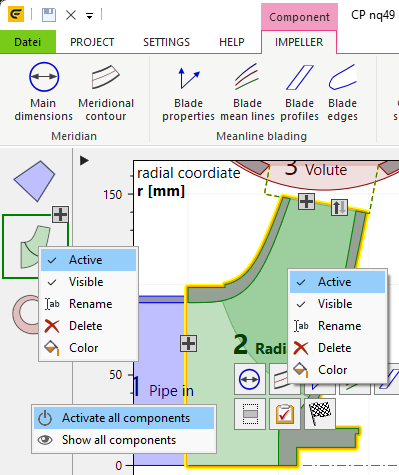
Active
An inactive component is read-only and also not going to be updated automatically. Inactive components are colored gray in all views.
Visible
Components can be made invisible in the Meridian view. This can be helpful when generating meridian images automatically during design exploration or optimization runs and irrelevant components like inflow/ outflow regions should not be visible.
Components, which are invisible in the Meridian view, are displayed in dark gray color in the components list (left) and are still part of the project and the exported geometry.
To make invisible components visible again, the components list (left) has to be used.
Rename
Change the caption of a component. The caption is displayed in the components list (left) as a hint when moving the mouse cursor on the icon, in the Meridian view, the 3D view and the report.
Delete
The selected component is deleted. If the Meridian view is selected, the <Del> key on the keyboard can be used alternatively.
Color
A component color can be selected from 15 predefined colors.
The color is used left in the components list (left) and in the Meridian view. Furthermore, it's used for text color in the report, the 3D model tree and the export window.
Additional menu items are available for duplicated components.
For complex projects with multiple components, all inactive or invisible components can be handled at once using the components list (left) context menu when clicking outside any component.