中文 English
You are here: Tutorials > Propeller Acoustics > Setting up the Broadband Source Acoustic model > Defining Physics and Conditions

Defining Physics and Conditions

The physics and conditions are specified as follows:

Adding Modules
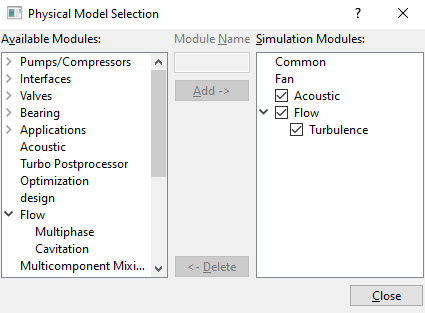
  1. Click Select Modules in the Model Panel. The Physical Model Selection dialog box opens.
  2. Select Fan under Available Modules list, click Add.
  3. Select Turbulence under Available Modules list, click Add.
  4. Select Acoustic under Available Modules list, click Add.
  5. Click Close to close the Physical Model Selection dialog box.


Figure 11.369 - Adding modules

General Operating Parameters
Fan module
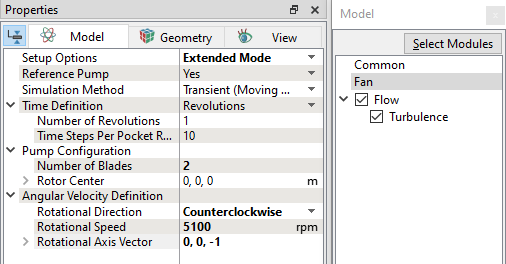
  1. Select Fan in the Model Panel.
  2. Enter Number of Blades as 2 under Pump Configuration list in the Model Tab of Properties Panel.
  3. Enter the parameters for the Angular Velocity Definition as follows:

    • Rotational Direction: Counterclockwise

    • Rotational Speed: 5100 rpm

    • Rotational Axis Vector: 0,0,-1

  4. Enter the parameter Rotor Center as 0,0,0.
 

Figure 11.370 - Fan Operating parameters

Acoustic module
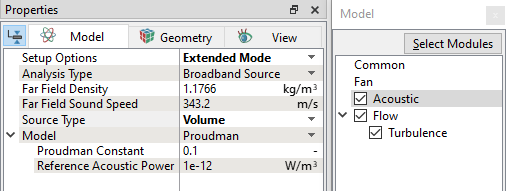
  1. Select Acoustic in the Model Panel.
  2. Select Analysis Type as Broadband Source in the Properties Panel.
  3. Select Source Type as Volume in the Properties Panel.


Figure 11.371 - Acoustic Operating parameters - Broadband source model

Boundary conditions

The boundary conditions are specified as follows:
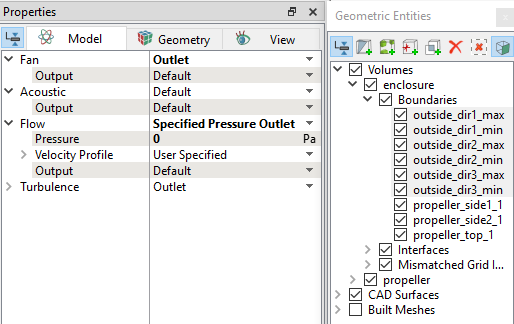
Outlet
  1. Select all Boundaries (names starting with outside_) from the Boundaries list under Volumes in the Geometric Entities Panel.
  2. Select Outlet from the Fan drop-down list in the Model Tab of Properties Panel.
  3. Select Specified Pressure Outlet from the Flow drop-down list in the Model Tab of Properties Panel.
  4. Enter the Pressure = 0 Pa.


Figure 11.372 - Outlet conditions


Rotor
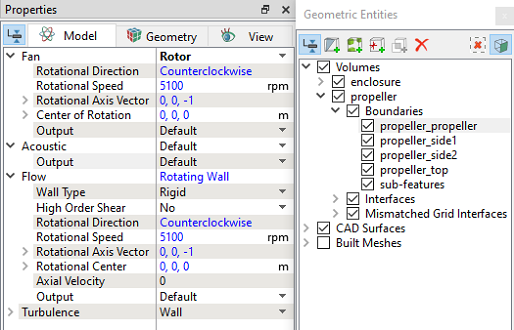
  1. Select propeller_ propeller from the Boundaries list under Volumes in the Geometric Entities Panel.

  2. Select Rotor from the Fan drop-down list in the Model Tab of Properties Panel.


Figure 11.373 - Rotor conditions


´ Note: There is no need to specify boundary conditions for acoustics as the Source Type is set to Volume. The Broadband Source model considers all volumes as the source for the analysis by default.


Fluid properties
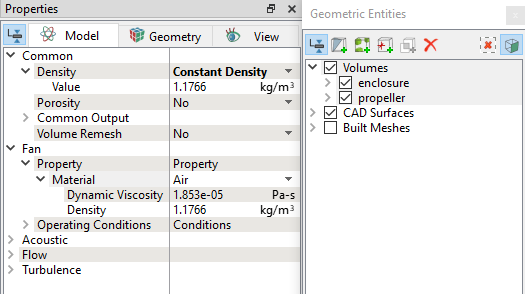
  1. Select all Volumes in the Geometric Entities Panel.
  2. Select Model Tab in the Properties Panel.
  3. Select Constant Density from the Density drop-down list under the Common list.
  4. Ensure the parameters for Property list are set as follows:

    • Material: Air
    • Dynamic Viscosity: 1.853e-05 Pa-s
    • Density: 1.176 kg/m3
 

Figure 11.374 - Fluid properties


´ Note: Save the project file as "acoustics_propeller_model_steady.spro".


Copyright © 2023 Simerics Inc.,