|
You are here: Automotive Templates and Tutorials > Automotive Tutorials > Coolant Filling System Tutorial > Contours
|
Contours
The contours from the results of coolant filling system simulation shown below are the volume fraction of coolant and pressure contours. The steps to create contours are:
- Click Load Results in the Simulation Panel.
- Select the required result file in the ensuing Load Results dialog box, click Open.
Volume fraction of coolant contours
- Select all Volumes in the Geometric Entities Panel.
- Select Volume Fraction - Component coolant under the Variable drop-down list in the Results Panel. For variables and legends, refer Post-Processing.
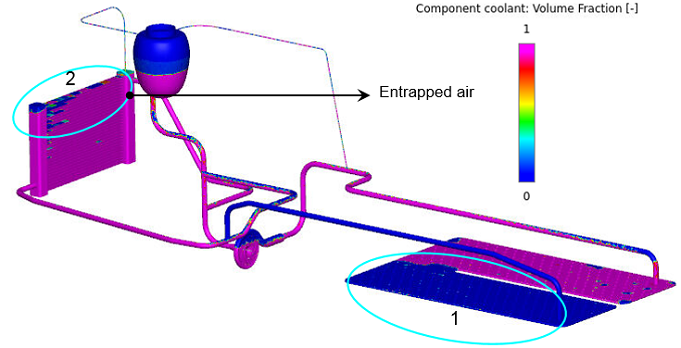
| ´ | Note: Half of the battery pack contains trapped air. In the radiator, tubes in the top contain trapped air, as shown with the encircled portions in Figure 7.297. |
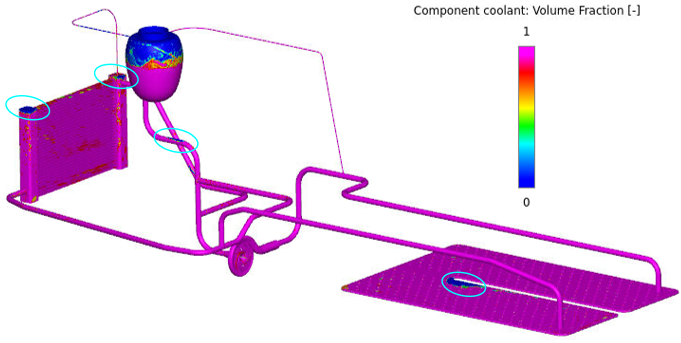
| Note: Small trapped air pockets can be observed, as shown with the encircled portions in Figure 7.298. |
Pressure contours
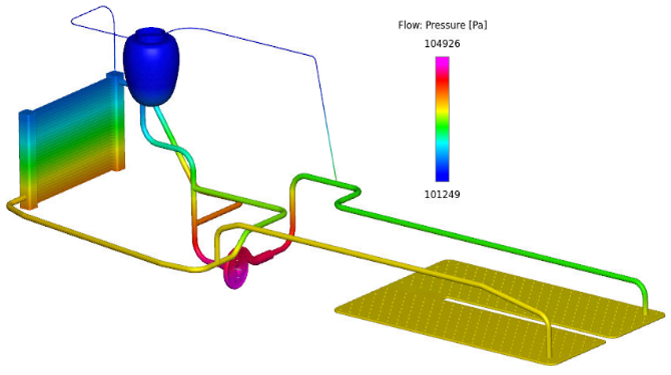
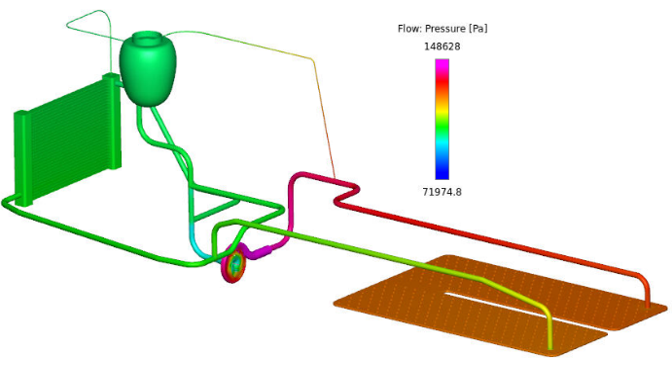
The pressure contours on the coolant filling system can be viewed as:
- Select all Volumes in the Geometric Entities Panel.
- Select Pressure from the Variables list under the Variable drop-down list in the Results Panel. For variables and legends, refer Post-Processing.