Piston Solid Surfaces
- Select CAD Surfaces piston in the Geometric Entities Panel.
- Select Split by Angle from the Operation drop-down list in the Properties Panel.
- Enter 75 deg for Angle and 15 for Maximum No. of Splits, click Split by Angle. Sixteen new CAD Surfaces are created in the Geometric Entities Panel.
- Select CAD Surfaces piston_01 and piston_03. Select Combine from the Operation drop-down list in the Properties Panel. Click Combine and rename as piston_underside.
- Select CAD Surfaces piston_05 and piston_06. Select Combine from the Operation drop-down list in the Properties Panel. Click Combine and rename as piston_top.
- Select CAD Surfaces pistonfluid_14, pistonfluid_15 and rename as piston_secondring, piston_topring respectively.
- Select CAD Surfaces piston_02 in the Geometric Entities Panel. Select Split by Angle from the Operation drop-down list in the Properties Panel.
- Enter 30 deg for Angle, click Split by Angle. Five new CAD Surfaces are created in the Geometric Entities Panel.
- Select CAD Surfaces pistonfluid_02_01 and rename as piston_skirt respectively.
- Select the remaining CAD Surfaces and select Combine from the Operation drop-down list in the Properties Panel. Click Combine and rename as piston.
|
|
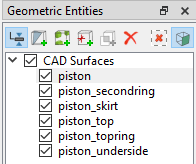
Figure 7.239 - Piston Solid surfaces
|