|
You are here: Automotive Templates and Tutorials > Automotive Tutorials > Piston Cooling Tutorial > Simulation
|
Simulation
This section explains the settings to run the coupled simulation using batch script. Fluid model is a transient multiphase heat transfer simulation and solid model is steady heat transfer simulation.
Fluid Model Simulation Settings
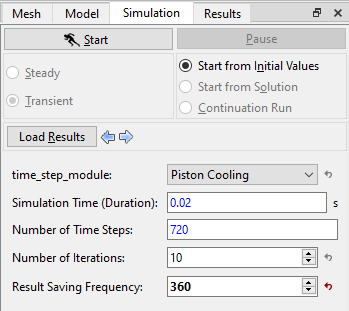
- Select Simulation Panel, verify that the Simulation Time (Duration) and Number of Time Steps are 0.02 s and 720 respectively.
- Verify that the Result Saving Frequency is 360, see Figure 7.252.
- Save the project as piston_fluid.spro.
| ´ | Note: The Result Saving Frequency option in the Simulation Panel is set to a small value (say 5 or 10) before running the simulation to obtain better animations. |
Solid Model Simulation Settings
Create Monitoring Points
In piston cooling simulation, monitoring points are created in the solid model to measure the temperature. The steps to create the monitoring points are as follows:
- On the Geometric Entities Panel toolbar, click three times on Create a Monitoring Point
 icon to create Points Point 01, Point 02 and Point 03.
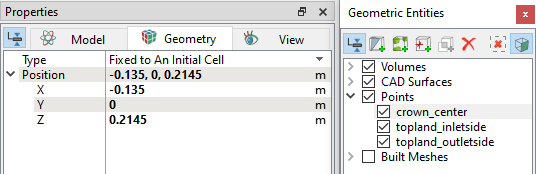
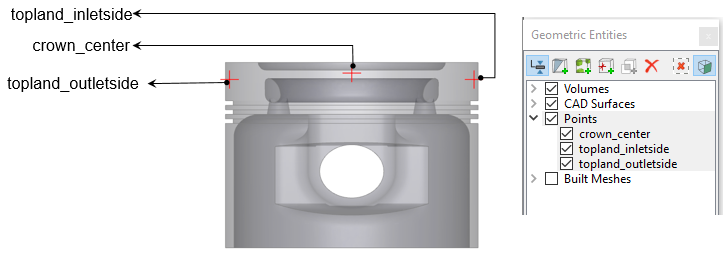
 - Rename the Points and specify their Position values as shown in Table 7.5 in the Geometry Tab of Properties Panel (see, Figure 7.253).
| Points | Rename as | Position Values |
|---|---|---|
| Point 01 | crown_center | -0.135, 0, 0.2145 |
| Point 02 | topland_inletside | -0.135, 0.047, 0.212 |
| Point 03 | topland_outletside | -0.135, -0.047, 0.212 |
Table 7.5 - Rename monitoring points
|
Note: Monitoring points need to be created before running the simulation for recording data, (refer Figure 7.254).The position of a Points may also be dragged to a new location using the Select |
 icon in
Simulation Settings
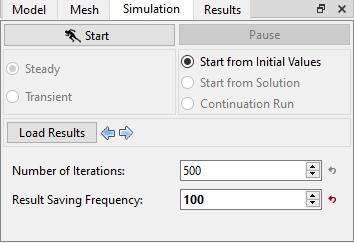
- Select Simulation Panel, verify that the Number of Iterations and Result Saving Frequency are 500 and 100 respectively, see Figure 7.255.
- Save the project as piston_solid.spro.
Coupled Run using Batch command
The fluid model (piston_fluid.spro) and the solid model (piston_solid.spro) run in a coupled manner using a batch run command. The procedure for running using batch commands is as follows:
- Create batchfile.txt in the project folder and copy the following lines under Description drop-down.
- In windows system, run by specifying “simerics_path -batch batchfile.txt”.
- In linux cluster, run by specifying “srun_simerics_path -batch batchfile.txt”.
 Description
open fluid piston_fluid.spro
open solid piston_solid.spro
exec 10 fluid solid