|
You are here: Automotive Templates and Tutorials > Automotive Tutorials > Windshield Defrost Tutorial > Plots
|
Plots
This section shows some of the common plots used in the windshield defrost simulation. The steps to create the plots are:
- Click Load Results in the Simulation Panel.
- Select the required result file in the ensuing Load Results dialog box, click Open.
Volume Fraction of Water and Ice
The volume fraction of ice and water are monitored with the following plots.
- Select Common in the Model Panel.
- Click Add XY-Plot
 icon in the Toolbar.
 - Click Click for Variable List
 icon and select ice_vf under Common in the Plot Panel.
 - Click Plot Selected Variables
 icon.
icon. - Similarly, select water_vf under Common and click Plot Selected Variables icon.
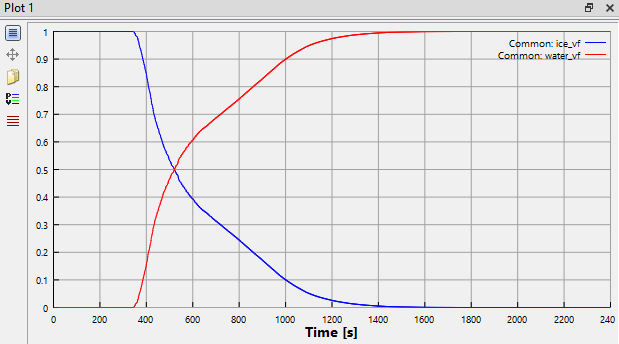
Figure 7.294 - Volume fraction
| ´ | Note: As the hot air enters the bottom of the windshield, ice melts and converted into water. Figure 7.294 shows decrease in ice volume fraction and increase in water volume fraction as time progresses. |