中文 English
You are here: Fluid Machinery Templates and Tutorials > Ball Valve > Ball 3D Valve Tutorial > Defining Physics and Conditions

Defining Physics and Conditions

The physics and conditions are specified as follows.

Adding Modules
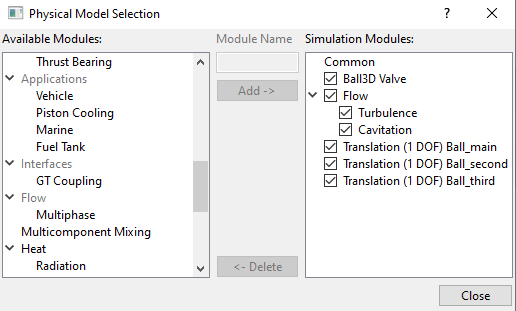
  1. Click Select Modules in the Model Panel. The Physical Model Selection dialog box opens.
  2. Ball3D Valve, Translation (1 DOF) Ball_main, Translation (1 DOF) Ball_second and Translation (1 DOF) Ball_third are automatically added to the Model Panel by the Valve Template Mesher.
  3. Select Turbulence and Cavitation under Available Modules list and click Add.
  4. Click Close to close the Physical Model Selection dialog box.


Figure 6.649 - Adding modules

Ball 3D Operating Parameters
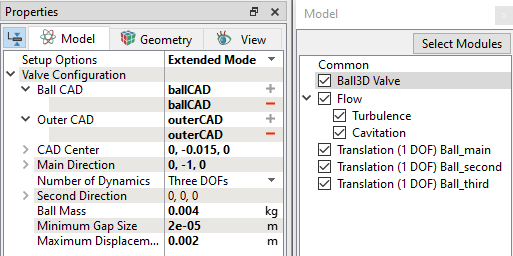
  1. Select Ball3D Valve in the Model Panel.
  2. Select Extended Mode for the Setup Options drop-down list in the Model Tab of Properties Panel.
  3. Verify that ballCAD is selected for Ball CAD and outerCAD is selected for Outer CAD.
  4. Verify that CAD Centre is 0,-0.015,0.
  5. Verify that Main Direction is 0,-1,0.
  6. Select Number of Dynamics as Three DOFs.
  7. Set Second Direction as 0,0,0.
  8. Set Ball Mass as 0.004.
  9. Set Minimum Gap Size as 2e-05 m and Maximum Displacement as 0.002 m.
 

Figure 6.650 - Ball3d operating parameters

Flow Parameters
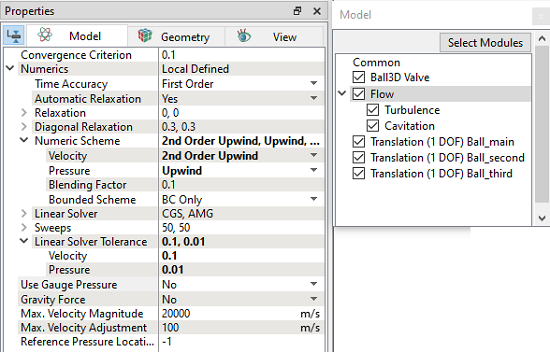
  1. Select Flow in the Model Panel.
  2. Select 2nd Order Upwind for Velocity under Numerical scheme.
  3. Set Pressure as 0.01 under Linear Solver Tolerance.


Figure 6.651 - Flow parameters

Translation (1 DOF) Ball_main Operating Parameters
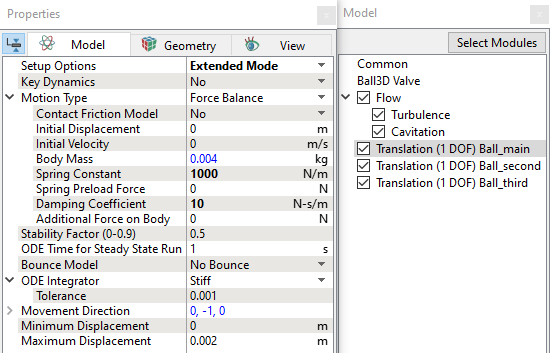
  1. Select Translation (1 DOF) Ball_main in the Model Panel.
  2. Select Advanced Mode for the Setup Options drop-down list in the Model Tab of Properties Panel.
  3. Enter the parameters for Time Definition as follows:
    • Number of Cycles: 10
    • Number of Time Steps per Cycle: 100
    • Motion Frequency: 400 Hz
  4. Select Force Balance in the Motion Type drop-down list.
  5. Enter the parameters for Motion Type as follows:
  • Spring Constant: 1000 N/m
  • Damping Coefficient: 10 N-s/m


Figure 6.652 - Translation (1 DOF) Ball_main operating parameters

´ Note: The Number of Time Steps per Cycle is an important parameter and must be large enough to achieve a smooth solution.
Translation (1 DOF) Ball_second Operating Parameters
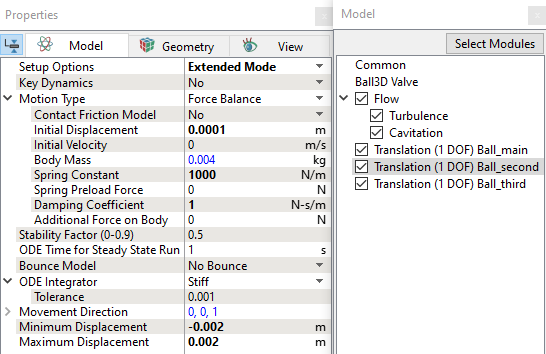
  1. Select Translation (1 DOF) Ball_second in the Model Panel.
  2. Select Advanced Mode for the Setup Options drop-down list in the Model Tab of Properties Panel.
  3. Select Force Balance in the Motion Type drop-down list.
  4. Enter the parameters for Motion Type as follows:
    • Initial Displacement: 0.0001 m
    • Spring Constant: 1000 N/m
    • Damping Coefficient: 1 N-s/m
  5. Set Minimum Displacement as -0.002 and Maximum Displacement as 0.002.


Figure 6.653 - Translation (1 DOF) Ball_second operating parameters


Note: An initial displacement of 0.0001 m is provided in the second direction for demonstration of 3D movement of the ball valve.


Translation (1 DOF) Ball_third Operating Parameters
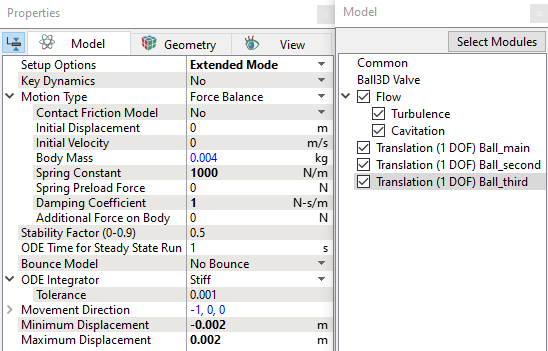
  1. Select Translation (1 DOF) Ball_third in the Model Panel.
  2. Select Advanced Mode for the Setup Options drop-down list in the Model Tab of Properties Panel.
  3. Select Force Balance in the Motion Type drop-down list.
  4. Enter the parameters for Motion Type as follows:
    • Spring Constant: 1000 N/m
    • Damping Coefficient: 1 N-s/m
  5. Set Minimum Displacement as -0.002 and Maximum Displacement as 0.002.


Figure 6.654 - Translation (1 DOF) Ball_third operating parameters

Boundary Conditions

The boundary conditions for the Ball 3D valve are specified as follows:

  1. Select Boundaries from the Geometric Entities Panel.
  2. In the Model Tab of Properties Panel, verify the boundary type for the ball3d drop-down list as Ball Wall for ball3d_valve_inner boundary.
 

Note: The boundary conditions for the ball 3D valve volume generated using the Ball Valve Template Mesher are automatically set by the template.


Inlet
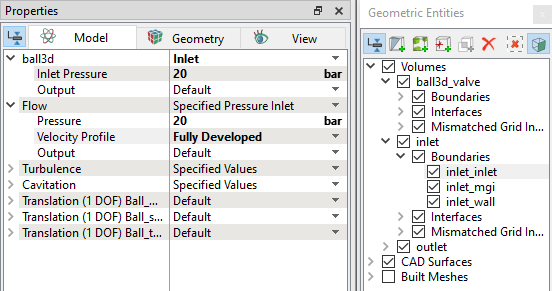
  1. Select inlet_inlet from the Boundaries list in the Geometric Entities Panel.
  2. Select Inlet from the ball3d drop-down list in the Model Tab of Properties Panel.
  3. Enter Inlet Pressure as 20 bar.
  4. Select Fully Developed for Velocity Profile under Flow.


Figure 6.655 - Inlet conditions

Outlet
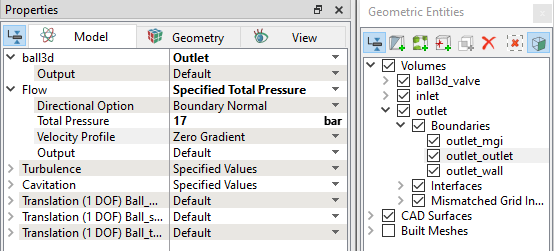
  1. Select outlet_outlet from the Boundaries list under Volumes in the Geometric Entities Panel.
  2. Select Outlet from the ball3d drop-down list in the Model Tab of Properties Panel.
  3. Select Specified Total Pressure for the Flow drop-down list.
  4. Enter Total Pressure as 17 bar.


Figure 6.656 - Outlet conditions

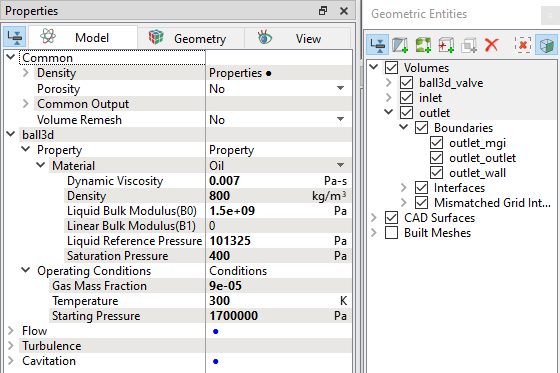
Fluid Properties
  1. Select Volumes in the Geometric Entities Panel.
  2. Select Model Tab in the Properties Panel.
  3. Enter the parameters in Property list as follows:
  • Dynamic Viscosity0.007 Pa-s
  • Density: 800 kg/m3
  • Liquid Bulk Modulus (B0): 1.5e+09 Pa

  • Liquid Reference Pressure: 101325 Pa

  • Saturation Pressure: 400 Pa

  • Enter the parameters for Operating Conditions as follows, except for Inlet volume.

    • Gas Mass Fraction: 9e-05
    • Operating Temperature: 300 K
    • Starting Pressure: 1700000 Pa
  • Select Inlet volume in the Geometric Entities Panel, enter the parameters for Operating Conditions as follows:

    • Gas Mass Fraction: 9e-05
    • Operating Temperature: 300 K
    • Starting Pressure: 20 bar
  •  

    Figure 6.657 - Fluid properties


    Copyright © 2023 Simerics Inc.,