-
Open inputFile_template.txt file available in the tutorial folder.
-
Specify the baseName of the project file as centrfugal_model_npshr as shown in Figure 6.46. Use the “Projectname” except “_steady” and “_transient”. The updated project files for npshr are saved as centrifugal_model_npshr_steady.spro and centrifugal_model_npshr_transient.spro.
- Enter 5 for variable totIter. Total 4 to 5 iterations are sufficient to evaluate
 . .
- Enter 200000 Pa for variable initPressure. Specify Initial Total Pressure high enough, such that cavitation does not happen.
-
Enter 0.025 m3/s for variable qv. This is the Volumetric Flux at which the simulation is performed.
- Enter 1200 for variable transient_time_step. This is the Total number of time steps corresponds to Total number of pump revolutions.
-
Save the inputFile_template.txt file.
|
|
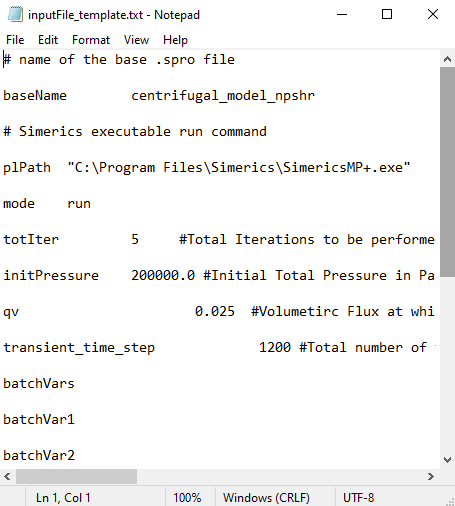
Figure 6.46 - Providing the input parameters
|