|
You are here: Fluid Machinery Templates and Tutorials > Centrifugal Pump > Centrifugal Pump Tutorials > Simulation
|
Simulation
This section explains the settings to run the Steady (Multiple Reference Frame) or the Transient (Moving Grid) simulations.
Solver Settings
- Select Centrifugal in the Model Panel. Select Extended Mode under Setup Options in the Model Tab of Properties Panel.
- For a transient simulation, select Flow in the Model Panel.
- Set Time Accuracy to Second Order under Numerics in the Model Tab of Properties Panel.
- Set Velocity to 2nd Order Upwind under Numeric Scheme.
| ´ | Note: The Second Order Upwind Scheme is more accurate, and is strongly recommended for Centrifugal systems. |
Steady simulation
- Select Centrifugal in the Model Panel.
- Select Simulation Method to Steady (Multiple Reference Frame) in the Model Tab of Properties Panel.
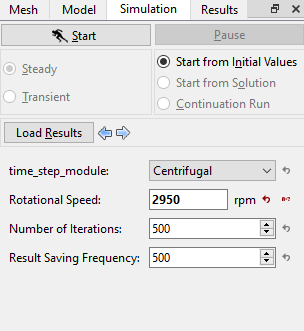
- Select Simulation Panel, set Number of Iterations as 500 and Result Saving Frequency as 500.
- After you save the project, click Start to run the simulation (see, Figure 6.30).
- The result files are saved as .sres in the working folder (Example: "centrifugal_model_steady.sres"). This file is overwritten depending on the Result Saving Frequency
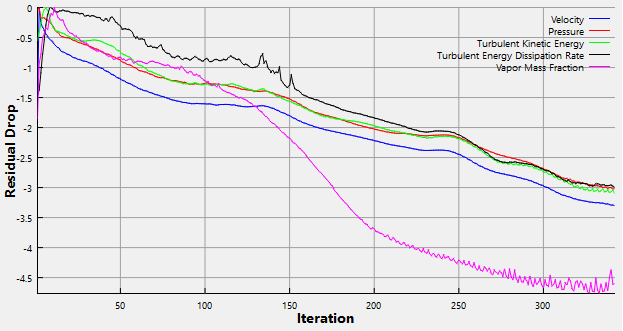
The residuals for the Steady-state simulation are displayed under the Residual Tab in the Plot Panel as shown in Figure 6.31.
|
| Note: The default Converge Criterion is 0.001 for Steady-state simulations. A Steady-state simulation will run until the residual for each variable drops by 3 orders or until the maximum Number of Iterations is reached. |
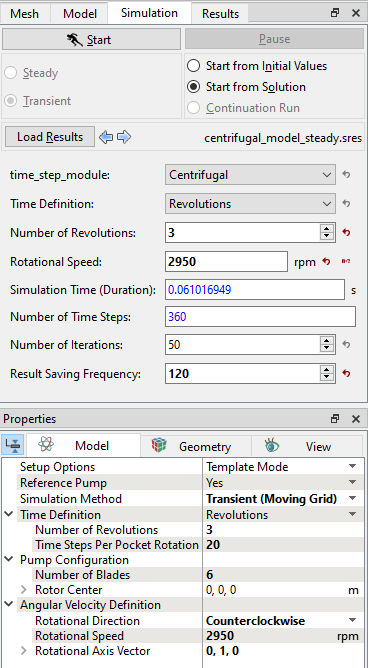
Transient simulation
The residuals for the transient simulation are displayed under the Residual Tab in the Plot Panel as shown in Figure 6.33. |
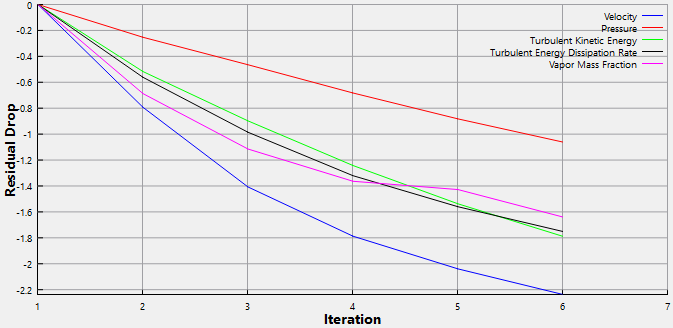
| Note: The default Converge Criterion is 0.1 for Transient simulations. When the residuals for all the variables drop by one order or the maximum Number of Iterations is reached, the calculation proceeds to the next time-step. |