Defining Physics and Conditions
The physics and conditions are specified as follows.
Adding Modules
- Click Select Modules in the Model Panel. The Physical Model Selection dialog box opens.
- Crescent is automatically added to the Model Panel by the Rotor Template Mesher.
- Select Cavitation under Available Modules and click Add.
-
Click Close to close the Physical Model Selection dialog box.
|
|
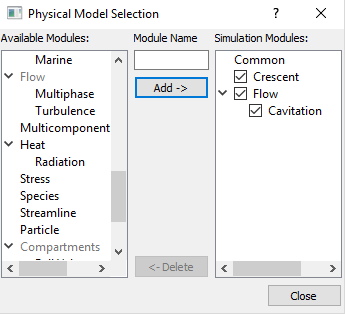
Figure 6.338 - Adding modules
|
General Operating Parameters
- Select Crescent in the Model Panel
- Enter Number of Revolutions and Time Steps Per Drive Gear Tooth Rotation to 3 and 30 respectively for the Time Definition in the Model Tab of Properties Panel.
-
Enter the parameters for the Angular Velocity Definition as follows.
- Rotational Direction: Counterclockwise
- Rotational Speed: 2000 rpm
- Rotational Axis Vector: 0, 0, 1
|
|
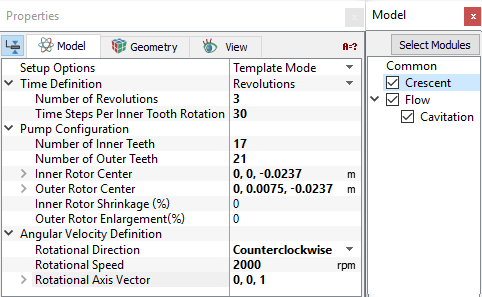
Figure 6.339 - Operating parameters
|
Boundary Conditions
The boundary conditions are specified as follows:
Inlet
- Select inlet_inlet from the Boundaries list under Volumes in the Geometric Entities Panel.
- Select Inlet from the Crescent drop-down list in the Model Tab of Properties Panel.
- Enter Inlet Pressure as 101325 Pa.
|
|
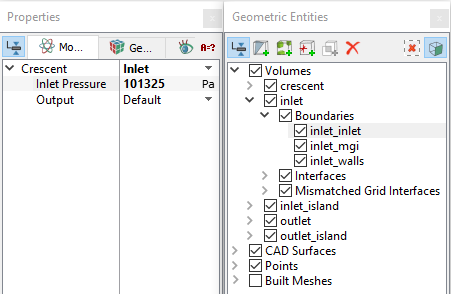
Figure 6.340 - Inlet conditions
|
Outlet
- Select outlet_outlet from the Boundaries list under Volumes in the Geometric Entities Panel.
- Select Outlet from the Crescent drop-down list in the Model Tab of Properties Panel.
- Enter Outlet Pressure as 500000 Pa.
|
|
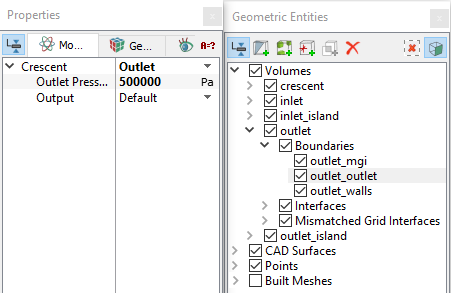
Figure 6.341 - Outlet conditions
|
The Inner and Outer rotors were assigned with a proper boundary condition during the rotor meshing operation. Their values are assigned based on the general operating conditions set above under the Crescent template. They can be verified or changed in the Properties Panel by selecting inner_rotor or outer_rotor under Boundaries.
| ´ |
Note: The Rotational Speed for the Outer Rotor is equal to the product of the Inner Rotor Rotational Speed and the ratio of the Number of Inner Teeth to the Number of Outer Teeth as follows: 
|
Fluid Properties
- Select Volumes in the Geometric Entities Panel.
- Select Model Tab in the Properties Panel
- Enter the parameters for Property list as follows.
Enter the parameters for Operating Conditions list as follows.
- Gas Mass Fraction: 9e-05
- Operating Temperature: 300 K
- Starting Pressure: 101325 Pa
|
|
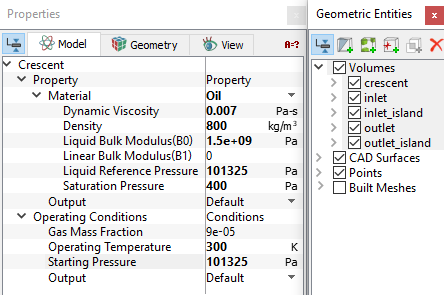
Figure 6.342 - Fluid properties
|