|
You are here: Fluid Machinery Templates and Tutorials > Crescent Pump > Crescent Pump Tutorial > Plots
|
Plots
This section shows some of the common plots used in the crescent pump simulation. The steps to create the plots are:
- Click Load Results in the Simulation Panel.
- Select the required result file in the ensuing Load Results dialog box, click Open.
Mass Flux
The mass balance is monitored with the mass flux plots.
- Select inlet_inlet and outlet_outlet under Boundaries in the Geometric Entities Panel.
- Click Add XY-Plot
 in the Toolbar.
 - Click Click for Variable List
 , select Mass Flux under Flow in the Plot Panel.
 - Select Plot Selected Variables
 > click Plot Property
  . In the Plot Property dialog box enable Moving Average and enter 510, click OK.
 - Click Combine Entity Data into a Single Curve
 to obtain the net mass flux.
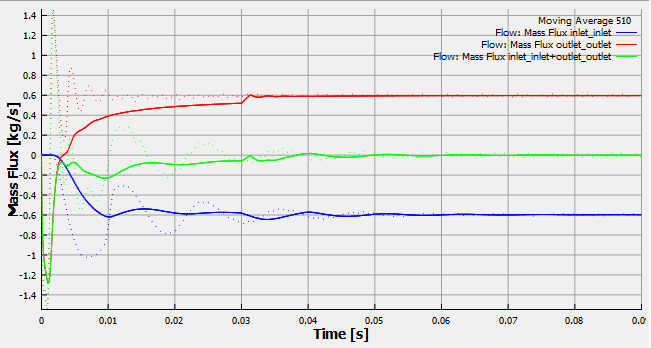
Figure 6.349 - Mass flux
| ´ | Note: The moving average is used in transient simulations to obtain the average behavior over the entire simulation time. It can be specified as, click Click for Variable List in Plot Property and enable Moving Average. The value in the Moving Average input is number of preceding time steps (sampling interval) for calculating the average. |
Pressure
The pressure ripples are monitored at the monitoring points outlet_top, outlet_bottom, inlet_top, and inlet_bottom. They are obtained as follows:
- Select outlet_top, outlet_bottom, inlet_top and inlet_bottom under Points in the Geometric Entities Panel.
- Click Add XY-Plot in the Toolbar.
- Click Click for Variable List
 in Plot Panel toolbar, select Pressure from Flow list.
 - Click Plot Selected Variables .
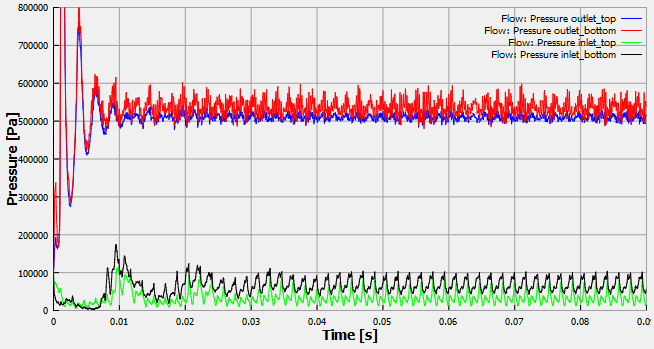
Figure 6.350 - Pressure
Power
The instantaneous integrated power about the axis of rotation for the Inner, Outer Rotor or Rotating Port is plotted. The power is computed based on the instantaneous integrated torque and the rotation speed.
To create the plot for the power:
- Select inner_rotor and outer_rotor under Boundaries in the Geometric Entities Panel.
- Click Add XY-Plot in the Toolbar.
- In the Plot Panel, select Revolution Average Power for Crescent list.
- Click Combine Entity Data into a Single Curve in the bottom left of Plot Panel, to obtain the net power.
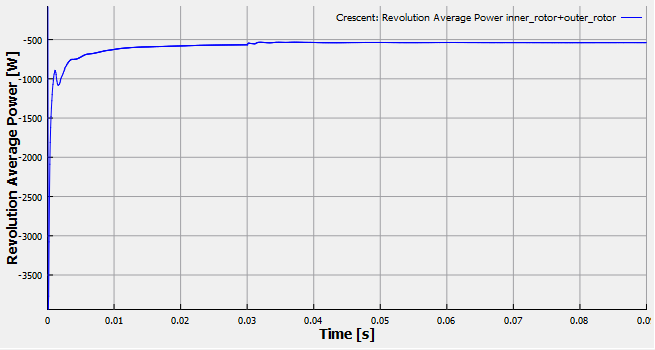
Figure 6.351 - Revolution average power