Boundary Conditions
The boundary conditions are specified as follows:
Inlet
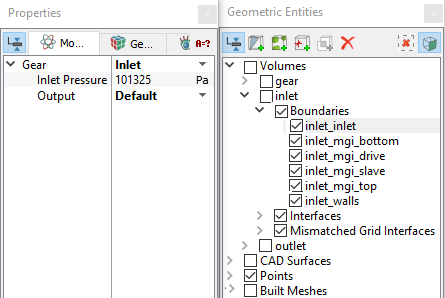
- Select inlet_inlet from the Boundaries list under Volumes in the Geometric Entities Panel.
- Select Inlet from the Gear drop-down list in the Model Tab of Properties Panel.
-
Enter Inlet Pressure as 101325 Pa.
|
|
Figure 6.177 - Inlet conditions
|
Outlet
-
Select outlet_outlet from the Boundaries list in the Geometric Entities Panel.
- Select Outlet from the Gear drop-down list in the Model Tab of Properties Panel.
- Enter Outlet Pressure as 500000 Pa.
|
|
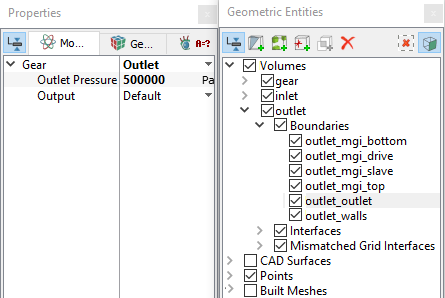
Figure 6.178 - Outlet conditions
|
Fluid Properties
- Select Volumes in the Geometric Entities Panel.
-
Select Model Tab of Properties Panel.
-
Enter the parameters for Property list as follows.
-
Enter the parameters for Operating Conditions list as follows.
- Gas Mass Fraction: 9e-5
- Operating Temperature: 300 K
- Starting Pressure: 101325 Pa
|
|
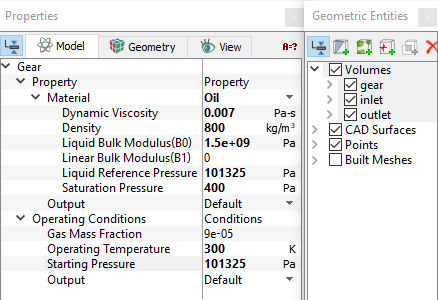
Figure 6.179 - Fluid properties
|