|
You are here: Fluid Machinery Templates and Tutorials > Progressive Cavity Pump > Progressive Cavity Model
|
6.15.3 Progressive Cavity Model
This section describes the operating parameters for the progressive cavity pump model and conditions specified for the Boundaries and Volumes.
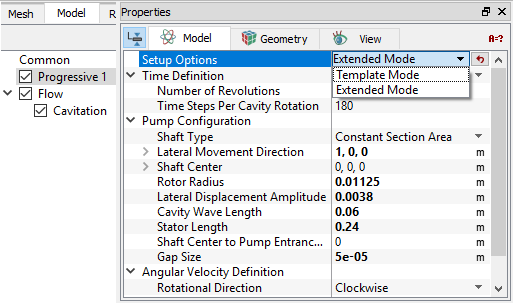
The Progressive module adds itself in the Model Panel (see, Figure 6.854), when the progressive cavity pump mesh is generated using the Rotor Template Mesher. The parameters under progressive module is accessed as follows:
Model Panel > Progressive
Properties Panel > Model Tab
Setup OptionsThis allows the user to specify the operating parameters in either:
Switching between Template Mode or Extended Mode does not alter any parameter related to Progressive module. It only changes the accessibility for other advanced settings (Numerics or boundary condition related) in other modules. As such, the user is free to go back and forth during the problem set-up. Reference PumpThis determines which template controls the Time Definition, when there is an additional pump or valve template as part of the simulation.This option is active only when there are multiple templates in the simulation. |
|
Note: Only one template can be set as the reference. The others are reset to No. |
On defining the above settings, further parameters are defined under: