|
You are here: Fluid Machinery Templates and Tutorials > Swash Plate Piston Pump > Swash Plate Piston Pump Tutorial > Computational domain
|
Computational domain
This section explains the preparation of surfaces to create the domain. This is done with the operations splitting, combining and renaming of the surfaces.
Pump Surfaces
- Select Split/Combine Geometry or Grid in the Mesh Panel.
- Select CAD Surfaces pump in the Geometric Entities Panel.
- Select Split Disconnected from the Operation drop-down list in the Properties Panel, click Split Disconnected. Eight new CAD Surfaces are created in the Geometric Entities Panel.
- Rename the CAD Surfaces pump_01, pump_02 and pump_03 as inlet, outlet and piston respectively.
-
Select the remaining CAD Surfaces and select Combine from the Operation drop-down list in the Properties Panel.
-
Click Combine and rename combined CAD Surfaces as vp.
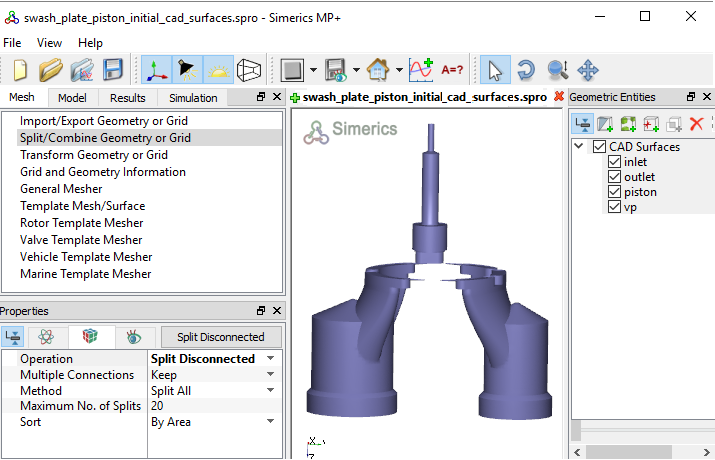
Figure 6.422 - Split of CAD surfaces
Inlet Surfaces
|
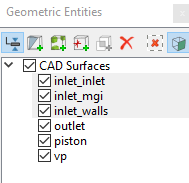
Figure 6.423 - Inlet surfaces |
Outlet Surfaces
|
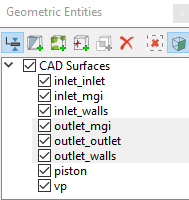
Figure 6.424 - Outlet surfaces |
Piston Surfaces
|
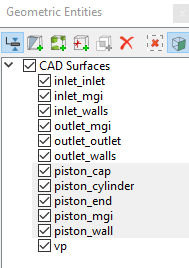
Figure 6.425 - Piston surfaces |
Valve Plate Surfaces
|
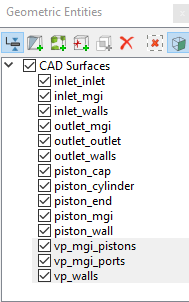
Figure 6.426 - Valve plate surfaces |
| CAD Surfaces | Rename as |
|---|---|
| vp, vp_01, vp_02, vp_03, vp_04, vp_05 and vp_16 | vp_walls |
| vp_06,vp_07, vp_10, vp_11 and vp_13 | vp_mgi_pistons |
| vp_08, vp_09, vp_12, vp_14 and vp_15 | vp_mgi_ports |
Table 6.18 - Combine CAD Surfaces
| ´ |
Note:
|