|
You are here: Additional Templates and Tutorials > GT-SUITE Coupling Module and Tutorial > Running GT Coupled co-simulation
|
10.3.4 Running GT Coupled co-simulation
In GT-SUITE
|
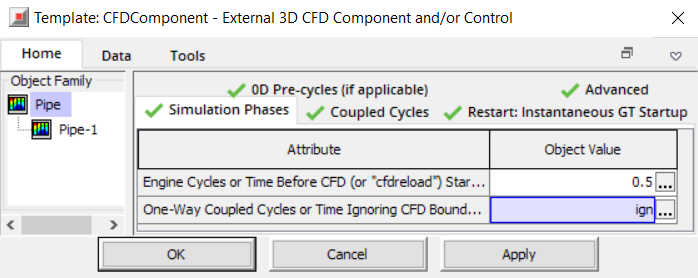
GT-SUITE always runs a Transient simulation. To achieve more stable results from the 1D-3D coupled simulation, the time control on coupling is used. This is achieved by clicking the CFDComponent and the Simulation Phases tab as shown in the Figure 10.90. The user can set one of the following .
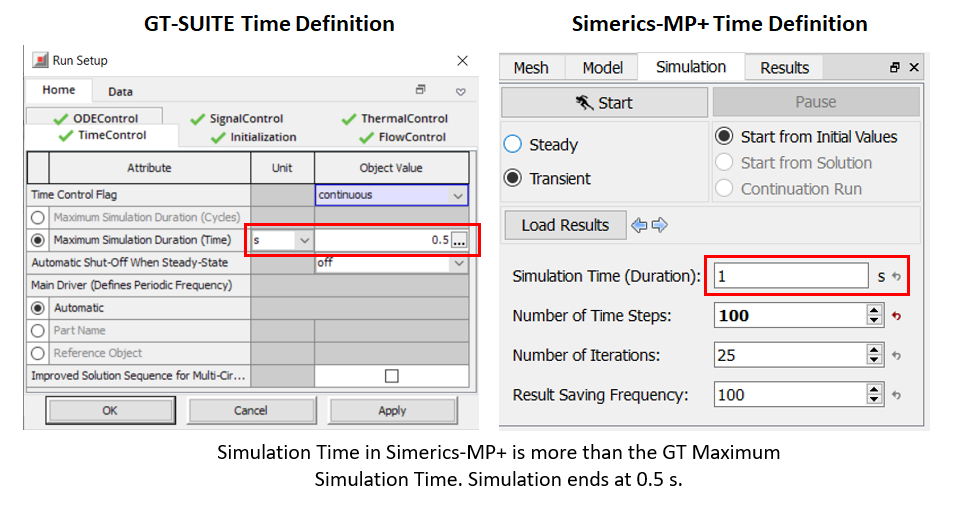
In Simerics-MP+The Time Definition is setup in the Simulation Panel for the CFD simulation as shown in Figure 10.91. The simulation can either be a Steady State Simulation or Transient simulation. If Simerics-MP+ simulation is set to Steady state, GT Coupling requires to set the timestep for GT corresponding to each Simerics-MP+ iteration, which is set in the Properties Panel as shown in Figure 10.91. If Simerics-MP+ simulation is set to Transient, the simulation runs for the shorter of the two total times specified in Simerics-MP+ and GT-SUITE. If the CFD Simulation Time (Duration) is more than the GT-SUITE Maximum Simulation Duration (Time), the CFD simulation is stopped, when the Total Simulation Time in GT-SUITE is reached. When Engine Cycles or Time Before CFD is specified in GT-SUITE, the 3D CFD simulation runs for a time equal to (Total Simulation Time - Engine Cycles or Time Before CFD). The coupled 1D-CFD co-simulation is run in Simerics-MP+ using Start in the Simulation Panel.
When GT-SUITE simulation is finished, Simerics-MP+ simulation is also terminated and a prompt to save the result file appears. |