|
You are here: Additional Templates and Tutorials > GT-SUITE Coupling Module and Tutorial > GT Coupling Tutorials > Specifying Fluid component
|
Specifying Fluid component
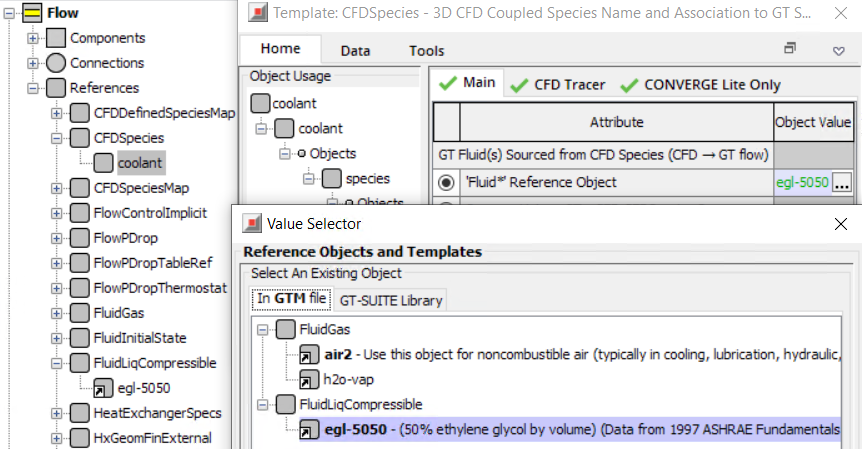
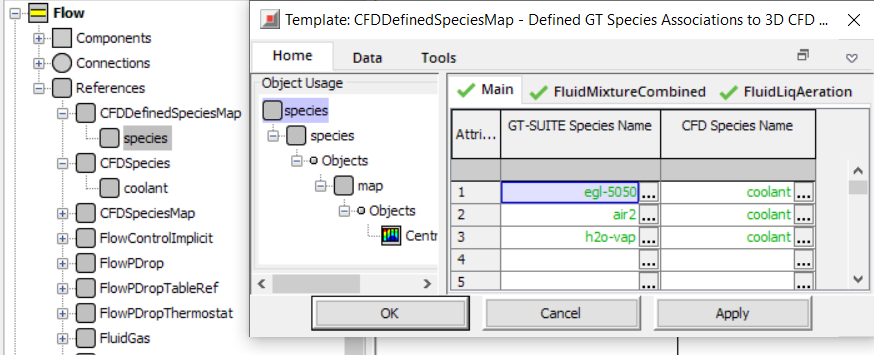
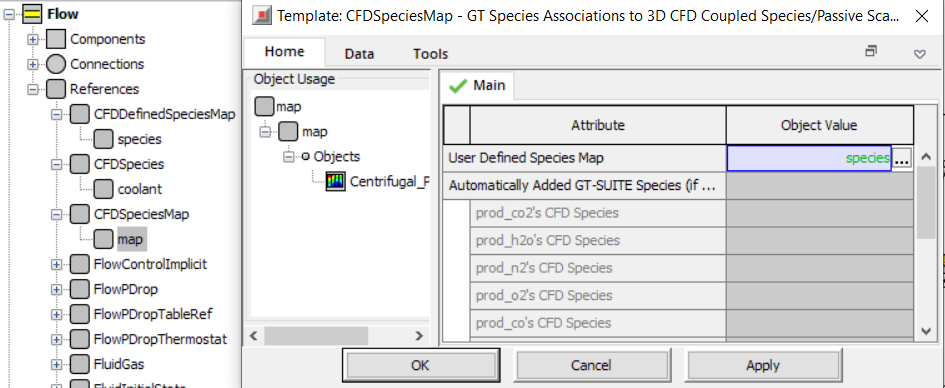
When fluid/species composition information is passed from GT-SUITE to Simerics-MP+ or vice versa, the GT-SUITE species need to be mapped to the corresponding CFD species. In this tutorial, the GT-SUITE species, egl-5050, defined under FluidLiqCompressible needs to be mapped to the respective CFD species. It is mapped through the object - coolant to the CFD simulation. The mapping is done by creating three reference objects CFDSpecies, CFDDefinedSpeciesMap and CFDSpeciesMap using the following steps:
- The reference object coolant is created under CFDSpecies and is specified as “Fluid” Reference Object – egl-5050 as shown in Figure 10.113. egl-5050 is ethylene glycol in the GT-SUITE fluid library.
- An object species is created under CFDDefinedSpeciesMap to create a one-to-one mapping of all fluids from the 1D to the 3D simulation as shown in Figure 10.114. The components from GT-SUITE are mapped to CFD as coolant.
- The object map is created under CFDSpeciesMap as shown in Figure 10.115. This serves as the component connection for the coupled CFD simulation. The species object created under CFDDefinedSpeciesMap is selected as the Object Value for the map object. The CFD component coolant is passed to Simerics-MP+.