|
You are here: Additional Templates and Tutorials > GT-SUITE Coupling Module and Tutorial > GT Coupling Tutorials > Boundary/Interface conditions
|
Boundary/Interface conditions
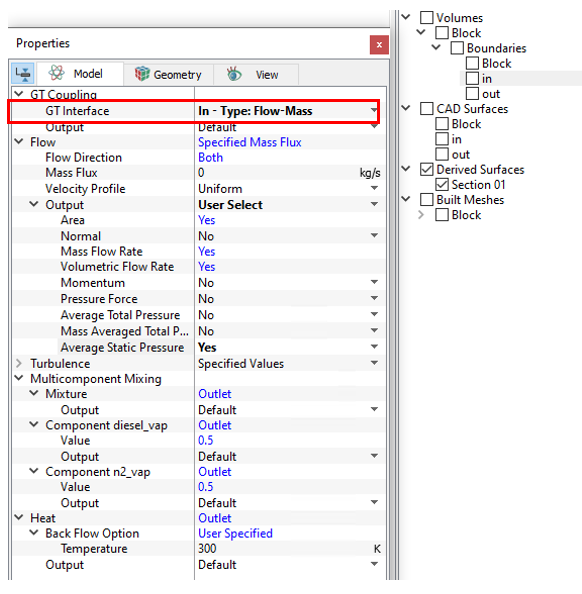
- Inlet Boundary
- Select in from the Boundaries list under Volumes in the Geometric Entities Panel.
- Select In Type:Flow-Mass for GT Interface under GT Coupling in the Model Tab of Properties Panel.
- Select User Select for Flow - Output and switch on the output Average Static Pressure in the Model Tab of Properties Panel.
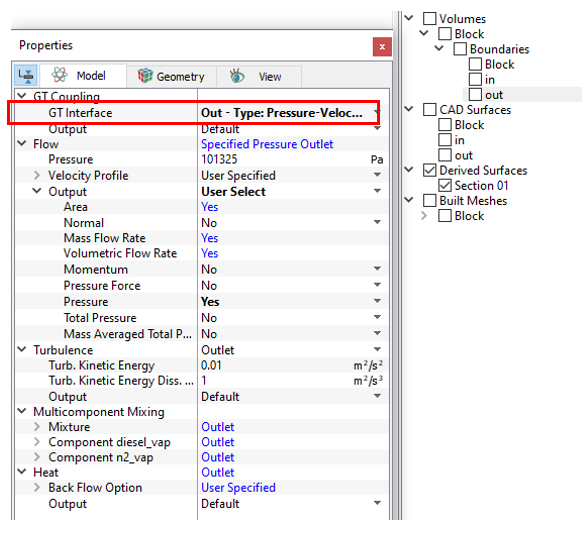
- Outlet Boundary
- Select out from the Boundaries list under Volumes in the Geometric Entities Panel.
- Select Out Type:Pressure-Velocity for GT Interface under GT Coupling in the Model Tab of Properties Panel.
- Select User Select for Flow - Output and switch on the output Pressure in the Model Tab of Properties Panel.
| Note: The interface type is set in the GT-SUITE model and cannot be modified in Simerics-MP+. Once an interface is matched, the conditions and properties for Flow, Multicomponent Mixing and Heat are set automatically based on the interface type. |
|
Note:The interface type is set in the GT-SUITE model and cannot be modified in Simerics-MP+. Once an interface is matched, the conditions and properties for Flow, Multicomponent Mixing and Heat are set automatically based on the interface type. |