|
You are here: Additional Templates and Tutorials > GT-SUITE Coupling Module and Tutorial > GT Coupling Tutorials > Fluid Component in CFD model
|
Fluid Component in CFD model
In Simerics-MP+, we create two components to link the CFDSpecies coming from GT-SUITE. In our case file block_demo.spro, the Multicomponent Mixing module consists of two added components diesel_vap and n2_vap shown in the Properties Panel by selecting Multicomponent Mixing in the Model Panel.
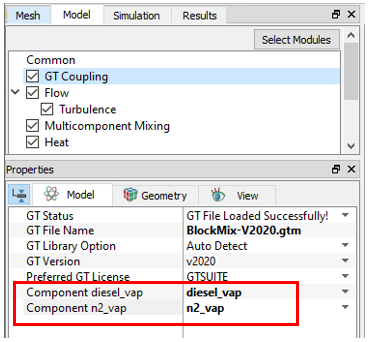
These components in Simerics-MP+ should be matched with the CFDSpecies in GT-SUITE. The GT Coupling module contains the drop-down list of CFDSpecies coming from GT-SUITE to be matched with the Simerics-MP+ components. It is done by the following steps as shown in Figure 10.106:
- Select GT Coupling in the Model Panel.
- Select diesel_vap for Component diesel_vap.
- Select n2_vap for Component n2_vap.