Contours
The most common contours for the VOF-tank filling simulation are the pressure and the velocity contours across the domain. The steps to create contours are:
- Click Load Results in the Simulation Panel.
- Select the required result file in the ensuing Load Results dialog box, click Open.
Create a section
A section is created with the following steps.
- Click Create a Cross-Section
 icon in the Geometric Entities Panel. A new section Section 01 is created under Derived Surfaces.
 - Select Section 01, the Type and Position are specified as Plane Y and -2.6149971 m in the Geometry Tab of Properties Panel.
Volume Fraction Contours
- Select Section 01 under Derived Variables in the Geometric Entities Panel.
- Select Component fuel under Variables list for the Variable drop-down list in the Results Panel. For variables and legends refer, Post-Processing.
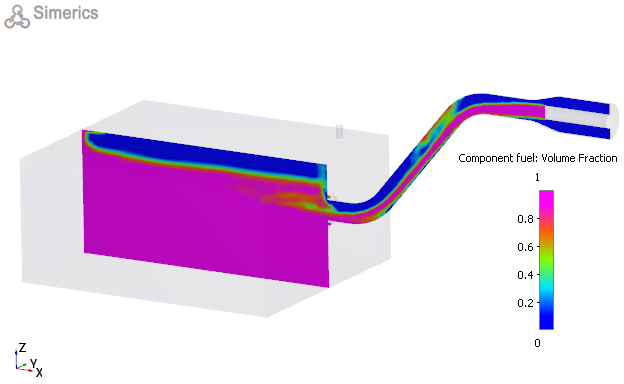
Figure 11.123 - Volume fraction contours