-
Select Marine Template Mesher in the Mesh Panel. The parameters can be changed in the Properties Panel.
- Select Planing in the Hull Type drop-down list.
-
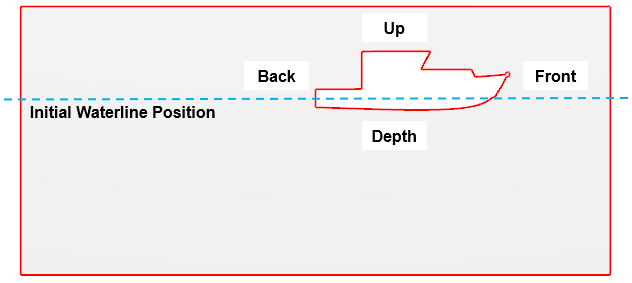
Verify the Domain Size as follows.
- Size Reference: Maximum Dimension
- Front: 0.5
- Back: 1.5
- Side: 1
- Depth: 0.8
- Up: 0.2
- Half Domain: Yes
-
Select the CAD Surfaces entity hull, portrudder and stbdrudder in the Geometric Entities Panel, click Add Surfaces
 icon for Hull in the Properties Panel. Similarly, select CAD Surfaces entity deck, click Add Surfaces icon for Deck respectively. icon for Hull in the Properties Panel. Similarly, select CAD Surfaces entity deck, click Add Surfaces icon for Deck respectively.
- Enter Forward Direction as -1,0,0.
- Enter Up Direction as 0,0,1.
- Enter Center of Gravity as 5.001,0,0.0.112 m.
-
Enter Waterline Definition as Relative to Centre of Gravity.
- Enter Waterline Position as -0.112 m. The Waterline position is always defined perpendicular to the Up Direction, relative to the Center of Gravity.(Example: If the waterline is at an absolute position of 0 m, to a vessel whose Center of Gravity is at 0,0,-1 m, the Waterline Position is defined as 1 m.)
|
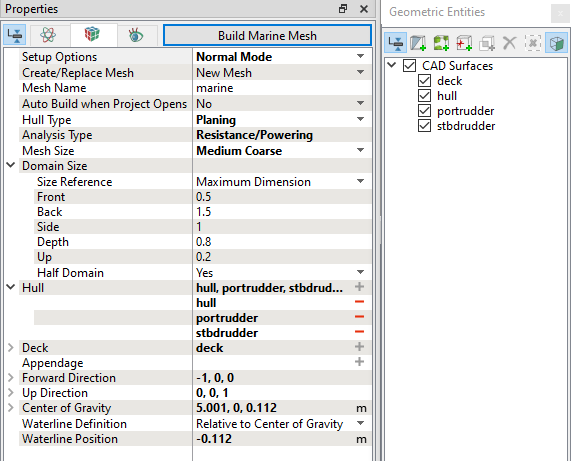
Figure 8.64 - Domain settings
|