5.3 Turbulence
For industrial applications, the flows of interest are almost always turbulent. They are invariably three dimensional and unsteady, and generally have a large spectrum of turbulent length and time scales. Ideally, Direct Numerical Simulation (DNS) should be used to capture all the scales in a turbulent flow. However, for DNS at practical Reynolds numbers (typically, in the order of 1e5 to1e7), the computational cost is way beyond the reach of the ever-fast-growing computing power, due to the requirement of extremely fine meshes (the total mesh is in the order of Re9/4), and very small time-step (Courant number is typically less than one). Alternatively, a more realistic way of conducting turbulent flow computations is to use some form of models such as the Large Eddy Simulation (LES) or Reynolds-Averaged Numerical Simulation (RANS). The LES approach resolves the large eddies and models only small-scale motions/small eddies. Though LES allows much coarser meshes and larger time steps than DNS, it still requires substantially fine meshes and small time steps. This makes it very expensive, if not impossible for most industrial applications. Instead, the commonly used RANS method, without resolving the turbulence spectrum, offers a considerably cost-effective approach to account for the turbulence effects on flow characteristics. It has proved to be capable of predicting the correct time-averaged flow field, in particular, for wall-bounded flows. Here, calibration according to the law-of-the-wall provides a solid foundation for modelling wall effects on turbulence. Hence, Simerics-MP adopts the RANS approach to model turbulent flows.
Simerics-MP models turbulence using the Turbulence module. The turbulence models available are the standard  and
and  models. For the near-wall treatment, the law-of-the-wall has three options: Standard Wall Function, Non-Equilibrium Wall Function and Unified Wall Function. This chapter contains a detailed description of the RANS turbulence models and wall functions. The conditions, settings, parameters and output variables for the Turbulence module are also discussed.
To activate the Turbulence module:
|
Figure 5.53 - Turbulence module |
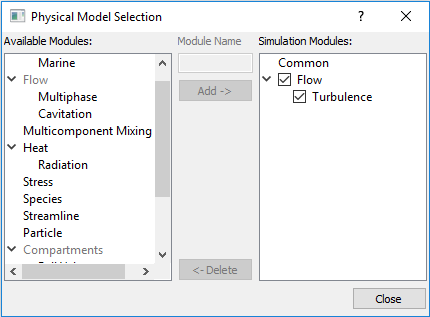
The module is explained as follows:
- Definitions: Terminologies used in Turbulence modelling.
- Physics: Models, methods and constants used in Turbulence module.
- Conditions: Specifying conditions for the entities-boundaries, interfaces, volumes under the Turbulence module.
- Output Variables: Outputs from the Turbulence module.