


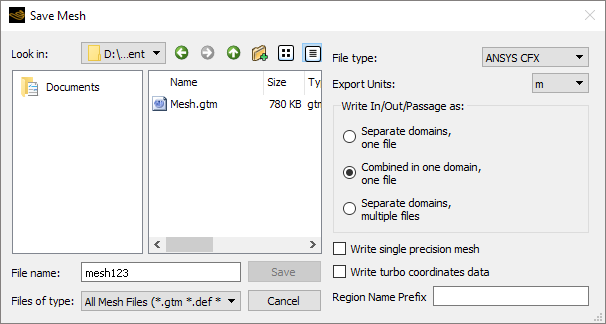
Set Look in to the directory in which you want to create the mesh file.
If File type is set to Ansys CFX, a
file of type .gtm is saved by default (that is, if no
extension is specified). You can also save a file of type
.def by adding the .def extension
to the specified filename. Both .gtm and
.def files contain regions that can be used in CFX-Pre
to set up a CFD problem.
If File
type is set to CGNS, TurboGrid saves a
CGNS (CFD General Notation System) file (extension .cgns) in HDF5 format. CGNS
files can be used by Ansys software such as CFX-Pre, CFD-Post, Fluent, and by third party software that supports:
The features that TurboGrid writes,
CGNS Version 4.3.0,
HDF5 1.12.2.
If you change File type, any existing file extension (for example, .def or .cgns) is changed automatically in the specified filename.
If File type is set to Ansys CFX,
the following options are available:
Separate domains, one file
The inlet and outlet domains remain separate from the passage domain. Three separate assemblies appear in CFX-Pre. This choice is ideal when you want to place the inlet and outlet domains in a different frame of reference from the passage.
Combined in one domain, one file
The inlet and outlet domains are combined with (merged with) the passage domain. One combined assembly appears in CFX-Pre. This choice is ideal when you want to keep the inlet and outlet domains in the same frame of reference as the passage.
Separate domains, multiple files
Up to three separate files are written:
<basename>.gtm for the passage domain,<basename>_Inlet.gtm for the inlet domain (if applicable), and<basename>_Outlet.gtm for the outlet domain (if applicable). Here,<basename>represents the specified name and .gtm is an example file extension.
If File type is set to Ansys CFX,
you can select the Write single precision mesh check box to
cause a single-precision mesh file to be written instead of a double-precision
file. The default is double-precision. There is little benefit to using
single-precision other than to reduce the size of the mesh file.
If File type is set to Ansys CFX,
you can select the Write turbo coordinates data check box
to include turbo coordinates data in the saved mesh file.
Turbo coordinates data includes the following coordinates on all blade surfaces:
U,V (surface coordinates on the blade)
Streamwise Location, Span Normalized
Axial Distance, Radius, Theta
When imported into CFX-Pre, turbo coordinates data can be used to define a custom coordinate system. Such a coordinate system can be used to specify coordinates for user locations using turbo coordinates rather than Cartesian or cylindrical coordinates. See Coordinate System Definition in the CFX-Pre User's Guide.
Turbo coordinates data can be extracted from the saved mesh file using
cfx5dfile. For details, see
Extracting Profile Data from Results Files in the CFX-Solver Modeling Guide.
Note:
The blade surfaces on which the turbo coordinates are defined usually extend beyond the actual blade.
You can export turbo coordinates data to one or more .csv files. For details, see Export Turbo Coordinates Data Command.
This property specifies a string of characters that is prefixed to all mesh region names when the mesh is written to file. This property is blank by default.
For information on how CFX-Pre handles duplicate mesh region names, see Importing Multiple Meshes.
Note: CGNS mesh region names have a 32–character limit. This limit sometimes causes the mesh region name to be truncated or replaced with a unique name (if necessary) when saved in TurboGrid.
For example,
ABCDEF0123456789ABCDEF0123456789regionA would be
truncated to
ABCDEF0123456789ABCDEF0123456789, and
ABCDEF0123456789ABCDEF0123456789regionB would be
renamed Boundary 3.
If your mesh region names have been truncated or renamed, you may want to manually rename the affected mesh regions in CFX-Pre or Fluent.