中文 English

Conditions

This section explains the conditions related to the boundaries and the volumes in a fuel tank filling and sloshing simulation.
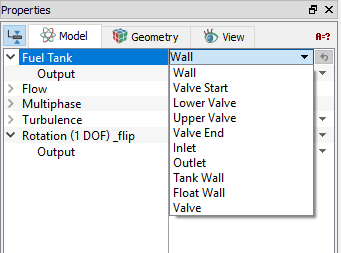
The conditions for a desired boundary are accessed as follows:

  1. Geometric Entities Panel > Boundaries > [Desired boundary]
  2. Properties Panel > Model Tab > Fuel Tank > [Desired options]

Each boundary may be assigned specific independent boundary conditions. The most of the boundary condition for valve are automatically assigned by the template module. But user can specify the boundary parameters as follows: Wall, Float Wall, Valve, Inlet and Outlet.


Figure 7.93 - Fuel tank - Conditions


  Note: All the boundary conditions for sloshing are same as fuel tank refueling.


The conditions for a desired volume are accessed as follows:

  1. Geometric Entities Panel > Volumes > [Desired volume]
  2. Properties Panel > Model Tab > Fuel Tank > Volume Type > [Desired options]

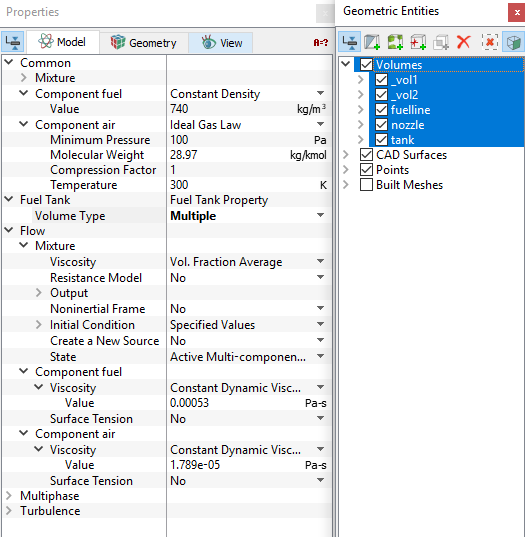
Specify the volume conditions, such as Density, Viscosity, Surface Tension and Initial Condition by selecting the desired volume, as shown in Figure 7.94.


Figure 7.94 - Refueling volume conditions


The conditions for a desired volume are accessed as follows:

  1. Geometric Entities Panel > Volumes > [Desired volume]
  2. Properties Panel > Model Tab > Fuel Tank > Volume Type > [Desired options]

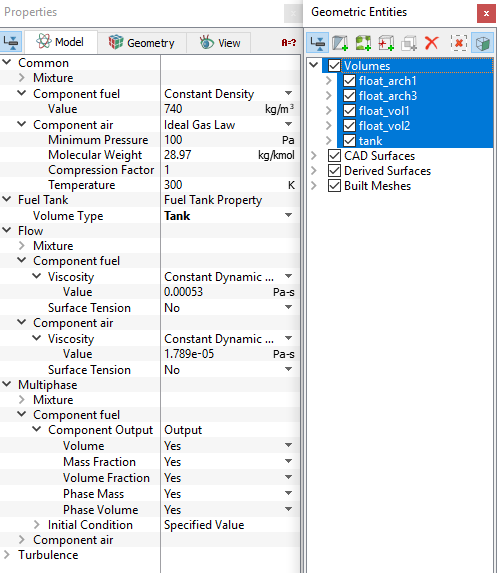
Specify the volume conditions, such as Density, Viscosity, Surface Tension and Initial Condition by selecting the desired volume, as shown in Figure 7.95.


Figure 7.95 - Sloshing volume conditions


Copyright © 2023 Simerics Inc.,