中文 English

7.2.3 Model

This section describes the operating parameters for the fuel tank module. This section also gives you the conditions specified for the boundaries and volumes.

The Fuel Tank, Multiphase, Turbulence and Valve (1 DOF)_flip modules are automatically added to the Model Panel and the module name is determined based on the type of the valve selected and the name given during meshing. The parameters under Fuel Tank module are accessed as follows:

  • Model Panel > Fuel Tank
  • Properties Panel > Model Tab


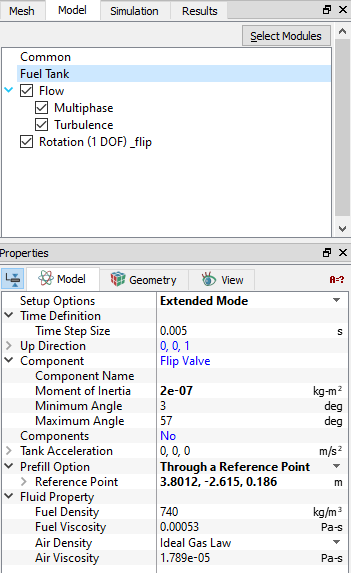
Figure 7.88 - Fuel Tank - Valve


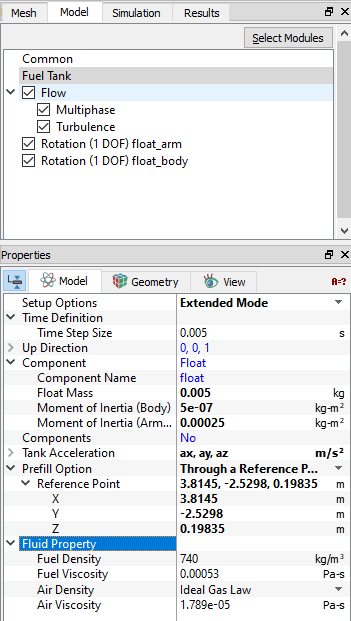
Figure 7.89 - Fuel Tank - Float

Fuel Tank Valve: Allows to input the following parameters see, Figure 7.88

  • Setup Options: Provide Option as Extended Mode.
  • Time Definition: Default Time Step size is 0.005. User can change as per requirement.
  • Component: Provide the Moment of Inertia, Minimum Angleand Maximum Angle.
  • Prefill Option: Provide the initial oil level Through a Reference Point .
  • Fluid Property: Default Fluid Property for air and liquid are as shown in Figure 7.88. User can change as per requirement.


Fuel Tank Float: In addition to parameters of Fuel Tank Valve, float allows to input the following parameters see, Figure 7.89

  • Component: Provide the Float Mass, Moment of Inertia (Body) and Moment of Inertia (Arm).
  • Tank Acceleration: Provide Tank Acceleration using Expression Editor.


Copyright © 2023 Simerics Inc.,