中文 English

Defining Physics and Conditions

The physics and conditions are specified as follows:

a) Adding Modules
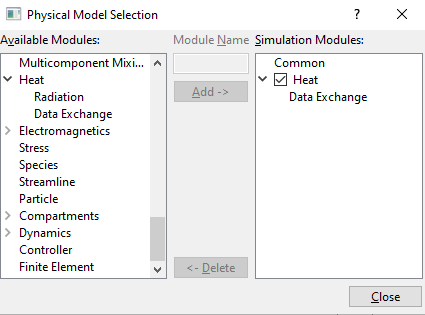
  1. Click Select Modules in the Model Panel. The Physical Model Selection dialog box opens.
  2. Select Data Exchange under Heat in the Available Modules and click Add.
  3. Click Close to close the Physical Model Selection dialog box.


Figure 10.32 - Adding modules

b) Common
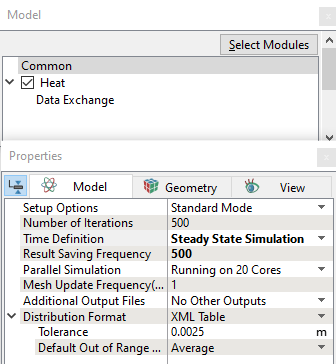
  1. Select Common in the Model Panel.
  2. Select Steady State Simulation from the Time Definition drop-down list in the Model Tab of Properties Panel.
  3. Enter Number of Iterations and Result Saving Frequency = 500.


Figure 10.33 - Common operating parameters


c) Data Exchange Module
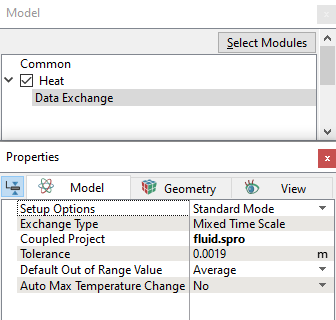
  1. Select Data Exchange in the Model Panel.
  2. Enter fluid.spro for Coupled Project in the Model Tab of Properties Panel, as shown in Figure 10.34.


Figure 10.34 - Data exchange parameter

d) Solid Coupling Condition
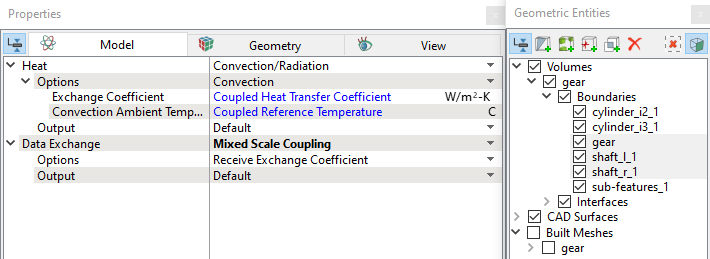
  1. Select gear, shaft_l_1 and shaft_r_1 from the Boundaries list.

  2. Select Mixed Scale Coupling from the Data Exchange drop-down list in the Model Tab of Properties Panel.


Figure 10.35 - Solid Coupling conditions

e) Volume conditions

The volume conditions are specified as follows:

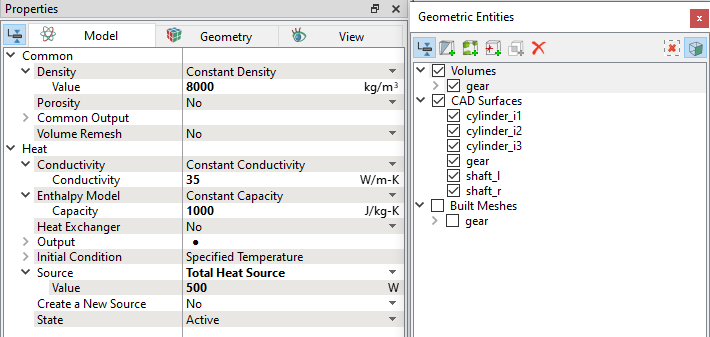
  1. Select gear Volumes in the Geometric Entities Panel and assign properties as shown in Table 10.2.
  2. Select User Select under Output list. Select Yes for Temperature drop down list.


Figure 10.36 - Boundary conditions

Density (kg/m3) Conductivity (W/m-K) Capacity (J/kg-K) Initial Condition, Temperature © Total heat source (W)
8000 35 1000 300 500

Table 10.2 - Solid properties


Copyright © 2023 Simerics Inc.,