6.11.2 Ball Mesher
This provides access to the meshing algorithms and meshing parameters for the various ball valves. The Valve Template Mesher advantage is that, it optimizes the mesh in the region of valve closure, based on the unique valve template parameters. This enables the creation of mesh with appropriate quality and minimal user effort. The mesh related settings are accessed as follows:
Mesh Panel > Valve Template Mesher > Ball Valve
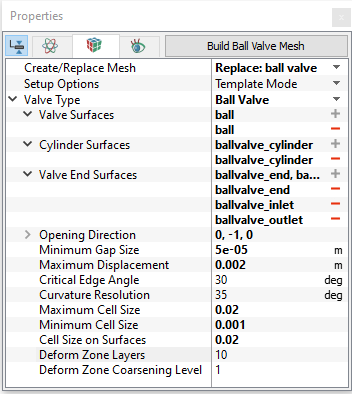
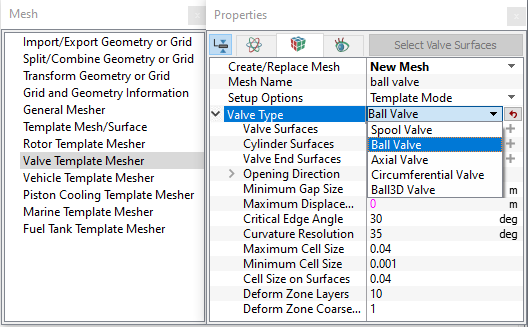
The following mesh related settings are available in the Geometry Tab of the Properties Panel as shown in Figure 6.598 and Figure 6.599
Create/Replace Mesh: Allows the user to select the parameters from the Create/Replace Mesh drop-down list as follows:
- New Mesh: To create a new mesh.
- Store Build Mesh: To store the mesh settings without generating any mesh.
- Replace: ball valve: To replace the existing mesh with new mesh settings.
Mesh Name: Allows user to name the mesh prior to mesh creation. This option is available when New Mesh or Store Build Mesh is selected under Create/Replace Mesh.
Setup Options: Template Mode or Extended Mode does not alter the valve mesh related parameters. They change the accessibility of other advanced settings during the model setup as explained in Model section. As such, the user is free to select any of these options during meshing.
Valve Type: Ball Valve is selected under the drop-down list of Valve Type.
On defining the above settings, further meshing parameters are specified for:
|
|
|
Once the parameters for meshing are defined, click Build Ball Valve Mesh in the Geometry Tab of the Properties Panel. The ball valve mesh is created and added under Built Meshes and the corresponding Volumes are generated in the Geometric Entities Panel. Also, Ball Valve module is added to the Model Panel.