6.16.2 Mesher
This section explains the settings available in the General Gear template to generate the dynamic mesh for the rotor chamber. The template enables the creation of mesh with appropriate quality and minimal user effort.
Gear Mesh Generation Strategy
General gear template creates a separate mesh for each individual gear and then connects them using MGI interfaces. The outside boundary or “container” of each gear mesh deforms at the gear engaging region. The deformations are defined by a "center line" between each pair of engaging gears. The "center line" is calculated using an iterative solver.
After the center line is defined, meshes are generated inside the deformed regions also using an iterative procedure.
The mesh related settings are accessed as follows:
Mesh Panel > Rotor Template Mesher
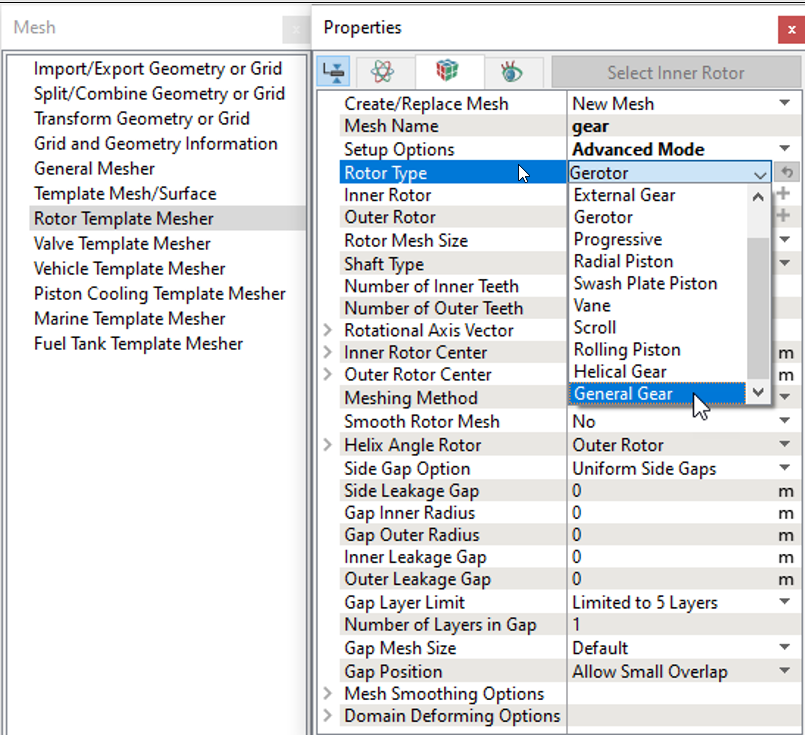
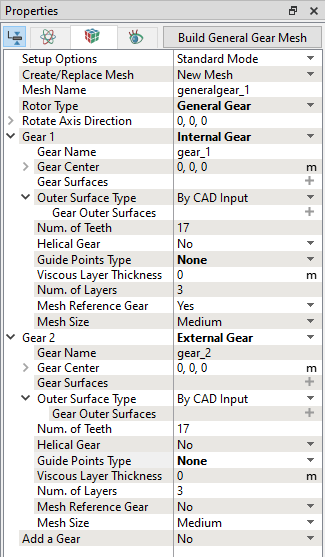
The following mesh related settings are available in the Geometry Tab of the Properties Panel as shown in Figure 6.887 and Figure 6.888
Create/Replace Mesh: Allows the user to select one of the following:
- New Mesh: To create a new mesh.
- Store Build Mesh: To store the mesh settings without generating any mesh.
- Replace: gear: To replace the existing mesh with new mesh settings.
Mesh Name: Allows user to name the mesh prior to mesh creation. This option is available when New Mesh or Store Build Mesh is selected under Create/Replace Mesh.
Setup Options: Allows the user to create the mesh using one of the following modes.
- Normal Mode: This mode provides standard access to the basic parameters to create the mesh.
- Advance Mode: This mode provides full access to all the meshing parameters to create the mesh.
Rotor Type: Select General Gear from the drop-down list.
On defining the above settings, further meshing parameters are specified for Gear Chamber Meshing.
|
|
|