|
You are here: Fluid Machinery Templates and Tutorials > Radial Piston Pump > Radial Piston Pump Mesher
|
6.6.2 Radial Piston Pump Mesher
This section explains the settings available in the Radial Piston template, to generate dynamic mesh for the pumping chamber. The template enables the creation of mesh with appropriate quality and minimal user effort. The leakages in the radial piston pump can also be defined and controlled while meshing. The mesh related settings are accessed as follows:
Mesh Panel > Rotor Template Mesher
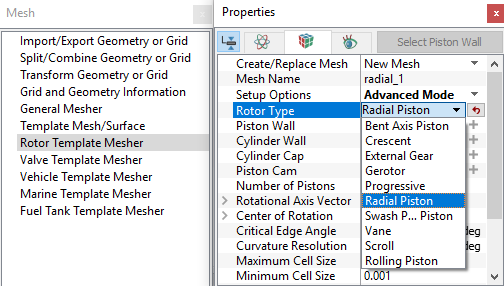
The following mesh related settings are available in the Geometry Tab of the Properties Panel as shown in Figure 6.354 and Figure 6.355.
Create/Replace Mesh: Allows the user to select one of the following:
-
New Mesh: To create a new mesh
-
Store Build Mesh: To store the mesh settings without generating any mesh.
-
Replace: radial: To replace the existing mesh with new mesh settings.
Mesh Name: Allows the user to name the mesh prior to mesh creation.This option is available when New Mesh or Store Build Mesh is selected under Create/Replace Mesh.
Setup Options: Allows the user to create the mesh using one of the following modes.
- Normal Mode: This mode provides standard access to the basic parameters to create the mesh.
- Advanced Mode: This mode provides full access to all the meshing parameters to create the mesh.
Rotor Type: Select Radial Piston from the drop-down list
On defining the above settings, further meshing parameters are specified for:
|
|
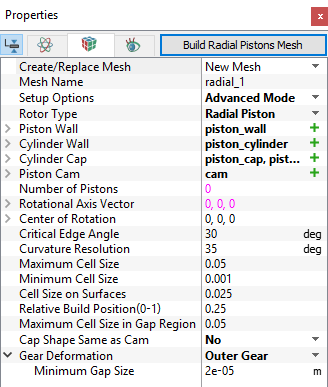
Once the parameters for meshing are defined, click Build Radial Piston Mesh in the Geometry Tab of the Properties Panel. The radial mesh is created and added under the Built Meshes and Volumes are generated in the Geometric Entities Panel. Also, Radial Piston module is added to the Model Panel.