|
You are here: Fluid Machinery Templates and Tutorials > Radial Piston Pump > Model > Operating Parameters
|
Operating Parameters
The operating parameters pertaining to the Radial Piston template involve the time definition for the simulation, pump configuration, angular velocity definitions for pump rotation and other advanced/extended settings (see, Figure 6.365).
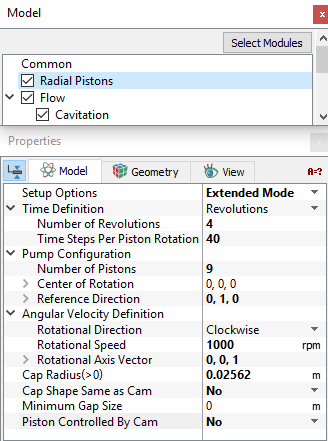
Figure 6.365 - Radial model-Operating parameters
Time Definition
This provides the following ways to specify the size and number of time steps for the Radial Piston pump simulation (see Figure 6.365):
- Revolutions: A single revolution corresponds to a pump rotation of 360 degrees. The parameters required under the Time Definition of Revolutions are:
- Number of Revolutions : The number of pump revolutions to be simulated.
- Time Steps Per Piston Rotation: The number of time steps taken to move a piston through one pocket.
The magnitude of the time-step size (s) and the angle of rotation (deg) depends on the Time Steps Per Piston Rotation and the Number of Pistons.

|
6.32 |

|
6.33 |
For a Time Definition of Revolutions, the Number of Time Steps is computed as follows:

|
6.34 |
- Number of Pockets: The amount of rotation based on the angle between two pistons.
- Time Steps Per Piston Rotation: The number of time steps taken to move a piston through one pocket.
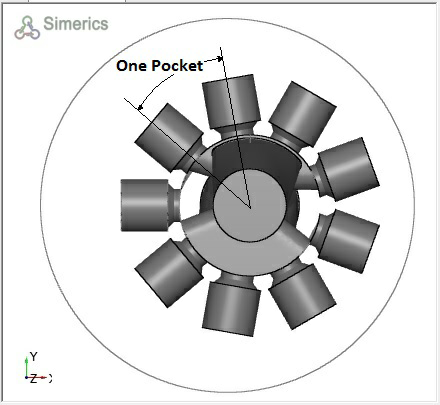
Figure 6.366 - Pocket-Radial piston
For a Time Definition of Pockets, the Number of Time Steps is computed as follows:

|
6.35 |
- Time Steps Per Piston Rotation
Number of Time Steps (in the Simulation Panel)
For a Time Definition of Total Time Steps, the Simulation Time (Duration) is computed as follows:
 | 6.36 |
|
Note: If the Number of Time Steps is displayed in Blue, it means that it is set and controlled elsewhere and cannot be changed in the Simulation Panel. |
|
|
Note:The setting of the Time Definition in the Model Tabof the Properties Panel and in the Simulation Panel are slaved to each other, such that changing the value in one panel, changes the value in the other. |
|
|
Note: If multiple templates are active, the Radial Piston must be set as the reference pump for the Time Definition option to be displayed. |
Pump Configuration
This contains the parameters pertaining to the geometry of the radial piston pump (see, Figure 6.365). The inputs such as Number of Pistons and Center of Rotation are same as those defined in the Radial Piston mesher.
- Reference Direction: This is the vector obtained by the cross product of Rotational Axis Vector and the axis of reference piston.
Figure 6.367 - Reference direction
Angular Velocity Definition
This contains parameters pertaining to the rotation of the pump. The parameters defined under the Angular Velocity Definition are Rotational Direction, Rotational Speed and Rotational Axis Vector (see Figure 6.365).
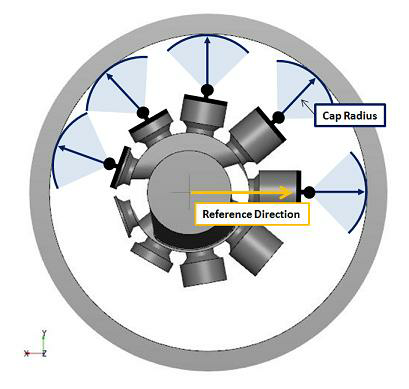
Cap Radius: This controls the distance from the pivot point to the piston cam.
|
Note: The Cap Radius option is unavailable if Piston Controlled by Cam is set to “Yes”. |
The parameter Cap Shape Same as Cam is explained in radial piston meshing.
Minimum Gap Size: Size of the gap between the cylinder cap and the piston cam if the piston is oriented such that the Cylinder Cap is adjacent to the Piston Cam. (Refer, Figure 6.361).
Piston Controlled by Cam
Creates a direct link between the Piston Face and the Piston Cam thus eliminating the Cap Radius. The parameter is set to “No” by default and setting it to “Yes” eliminates the Cap Radius option.
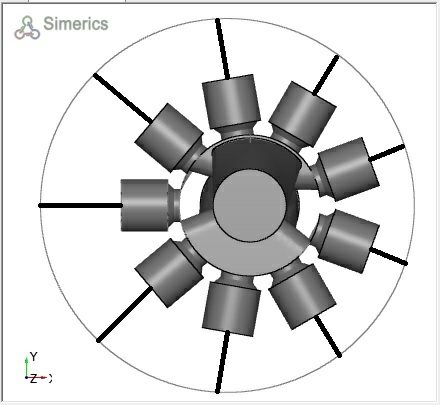
Figure 6.368 - Direct Link between piston face and piston cam