6.9.2 Translational Valve Mesher
This provides access to the meshing algorithms and meshing parameters for the various valve types. The Valve template mesher advantage is, that it optimizes the mesh in the region of valve closure, based on the unique valve template parameters.This enables the creation of mesh with appropriate quality and minimal user effort. The mesh related settings are accessed as follows:
Mesh Panel > Valve Template Mesher
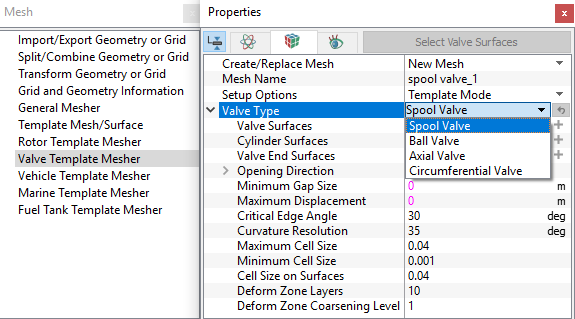
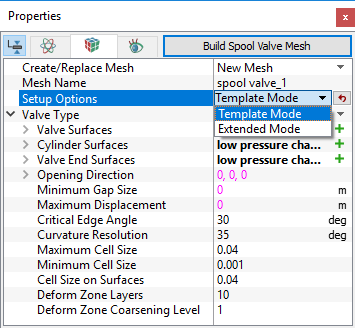
The following mesh related settings are available in the Geometry Tab of the Properties Panel as shown in Figure 6.510 and Figure 6.511
Create/Replace Mesh: Allows the user to select one of the following
- New Mesh : To create a new mesh.
- Store Build Mesh: To store the mesh settings without generating any mesh.
- Replace: spool valve: To replace the existing mesh with new mesh settings.
Mesh Name: Allows the user to name the mesh prior to mesh creation. This option is available when New Mesh or Store Build Mesh is selected under Create/Replace Mesh.
Setup Options: The options Template Mode or Extended Mode does not alter the valve mesh related parameters. They change the accessibility of other advanced settings during the model setup as explained in Model section. As such, the user is free to select any of these options during meshing.
Valve Type: The available types of valves under the drop-down menu are Spool valve, Ball valve and Axial valve (Circumferential valve comes under rotational type valve).
|
|
On defining the above settings, further meshing parameters are specified for:
Valve Surfaces: The Valve Surfaces corresponds to the moving boundaries of a valve chamber. They are assigned as follows:
- Select the valve surfaces under CAD Surfaces in Geometric Entities Panel.
- Click Add Surfaces
 icon to the right of Valve Surfaces or click Select Valve Surfaces tab in the Properties Panel.
Cylinder Surfaces: The Cylinder Surfaces of a valve chamber corresponds to the boundaries along which the mesh will slide and compress as the valve opens and closes. They are assigned as follows:
- Select cylinder surfaces under CAD Surfacesin Geometric Entities Panel.
- Click Add Surfaces icon to the right of Cylinder Surfaces or click Select Cylinder Surfaces tab in the Properties Panel. The Select Cylinder Surfaces operation automatically follows the Select Valve Surfaces operation.
Valve End Surfaces: The valve ends corresponds to the stationary boundaries of a valve chamber (not included in the cylinder surfaces). They are assigned as follows:
- Select valve end surfaces under CAD Surfaces in Geometric Entities Panel.
- Click the Add Surfaces icon to the right of Valve End Surfaces or click Select Valve End Surfaces tab in the Properties Panel. The Select Valve End Surfaces operation automatically follows the Select Cylinder Surfaces operation.
Opening Direction: This is a vector indicating the direction that the valve opens. This dictates the side of the valve face used to determine the Closed Position, the Minimum Gap Size, and the location of the Full Closure Model. This also correspond to the Movement Direction used by the Translation (1 DOF) module connected via the Dynamics option.
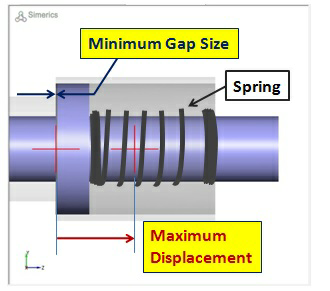
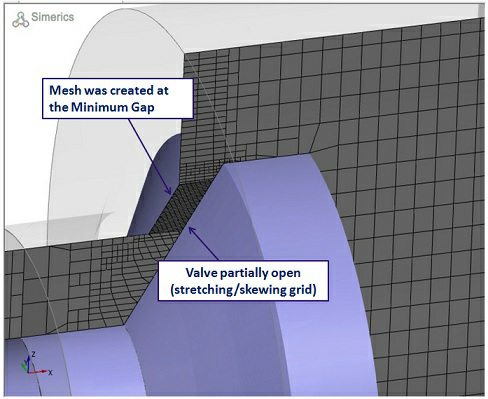
Minimum Gap Size: This is a numerical limit to avoid physical contact between valve and valve end surfaces when the valve is in closed position physically. At the same time, it also limits the over-compressing of mesh between valve and valve end surfaces while closing the valve. In other words, it is the minimum distance from the valve end at which the valve stops moving and limits the compression of mesh numerically.
|
|
- This is used by the valve mesher to optimize the mesh between the valve and valve end surfaces.
- During valve motion, for any displacement value in the Dynamics module between zero and minimum gap size, the valve always stays at the minimum gap position. The valve end surface is considered as the reference for valve displacement value. The Zero displacement value corresponds to the valve touching the valve end physically.
- There is no default value for Minimum Gap Size. It requires an user input value (greater than zero). To the extent that does not create an excessive number of mesh cells, a small (micron scale) Minimum Gap Size is recommended. A possible disadvantage of using a small (micron scale) gap size during meshing is that it can create a mesh with an excessive number of grid cells if the contact area for the valve face is large relative to the Minimum Gap Size. This disadvantage can be avoided by meshing using a Minimum Gap Size larger than the actual minimum gap, and then subsequently reducing this gap to the desired value for the simulation in the dynamic module.
Maximum Displacement: This is related to the amount of mesh displacement (see, Figure 6.512) which can occur as the valve moves in the Opening Direction. During meshing, it is used by the valve template mesher to optimize the mesh. Specify the maximum value of displacement.
It is recommended to set this displacement to the approximate maximum distance. The valve is expected to translate in the Opening Direction with the specified value. If that is unknown, the value could possibly open to a value slightly less or more than the maximum distance.
|
Note: The value of Minimum Gap Size and Maximum Displacement input during meshing are subsequently used to initialize the respective values in dynamic module for the same parameter, but the later can be changed prior to running a simulation. |
The parameters Critical Edge Angle, Curvature Resolution, Maximum Cell Size, Minimum Cell Size and Cell Size on Surfaces are described in the General Mesher.
Deform Zone Layers: This specifies the number of mesh layers between the valve face and the valve end. It is the number of grid lines/cells ‘N’ between the valve and valve end surfaces. The actual number of cells/grid lines in the generated mesh is usually (N-1), may not be exact due to the complexity of spool valve mesh itself. Specify the value in terms of positive integer.
Deform Zone Coarsening Level: This is an integer value used to determine the level of mesh coarsening outside the "deforming zone", where the valve surface and the valve end surface will be in physical contact. This value can usually be kept as the default value 1 in the mesh generation process. With a value of N (N greater than 1), the mesh outside the deforming zone is usually coarsened for (N-1) levels following the binary tree mesh structure. The actual mesh coarsening may not be as exact as (N-1), due to the complexity of the spool valve mesh itself. Specify the value in terms of positive integer.
Once the parameters for meshing are defined, click Build Mesh for respective type of valve in the Geometry Tab of the Properties Panel. The mesh is created and added under the Built Meshesand the corresponding Volumes are generated in the Geometric Entities Panel. Also, respective valve module (Spool Valve/Axial Valve/Ball Valve) module is added to the Model Panel. When each chamber of a connected valve is meshed with template, only one valve module can be retained out of the valve modules that get added for each chamber. Creating mesh with template mesher automatically assigns the proper boundary conditions (Cylinder surfaces, Valve end, and Valve) in the process.