Operating Parameters
The operating parameters pertaining to the Vane template involve the time definition for the simulation, pump configuration, angular velocity definitions for pump rotation and other advanced/extended settings (see, Figure 6.215).
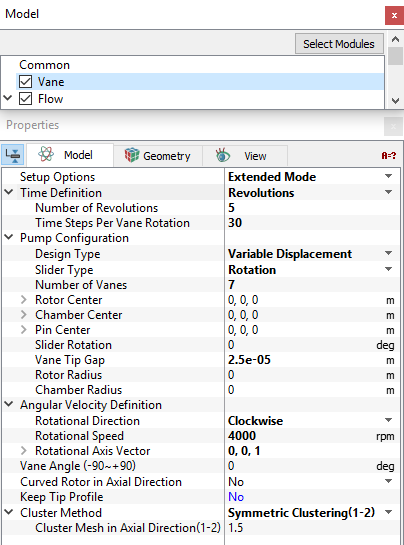
Figure 6.215 - Vane model-Operating parameters
Time Definition
This provides the following ways to specify the size and number of time steps for the vane pump simulation (see Figure 6.215):
- Revolutions: A single revolution corresponds to a pump rotation of 360 degrees. The parameters required under this Time Definition are:
- Number of Revolutions: The number of pump revolutions to be simulated.
- Time Steps Per Vane Rotation: This dictates the number of time steps taken to move a blade one pocket.
The magnitude of the time-step size (s) and the angle of rotation (deg) depend on the Time Steps Per Vane Rotation and the Number of Vanes as follows:

|
|

|
For a Time Definition of Revolutions, the Number of Time Steps is computed as follows:

|
- Number of Pockets: The amount of rotation based on the angle of a pump pocket.
- Time Steps Per Vane Rotation
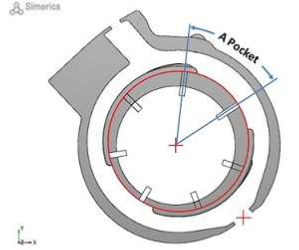
Figure 6.216 - Pocket-Vane
For a Time Definition of Pockets, the Number of Time Steps is computed as follows:

|
- Time Steps Per Vane Rotation
- Number of Time Steps (in the Simulation Panel)
For a Time Definition of Total Time Steps, the Simulation Time (Duration) is computed as follows:
 |
|
Note:
|
Pump Configuration
This contains parameters pertaining to the geometry of the vane pump (see Figure 6.215). The inputs such as i.e., Design Type, Slider Types, Number of Vanes, Rotor Center,Chamber Center,Pin Center,Slider Rotation,Slider Displacement,Sliding Direction,Vane Tip Gap,Rotor Radius and Chamber Radius are same as those defined in the mesher.
Angular Velocity Definition
This contains parameters pertaining to the rotation of the pump. The parameters defined under the Angular Velocity Definition are: Rotational Direction, Rotational Speed and Rotational Axis Vector (see Figure 6.205).
Cluster Method
This method controls the axial and radial grid distribution in the inner and outer rotor using the following methods:
- Original Distribution: gives a uniform cell spacing.
- Symmetric Clustering(1-2): specifies the amount of clustering towards the upper and lower surfaces of the vane chamber volume which controls the axial grid distribution in the Vane pumping chamber. The option Cluster Mesh in Axial Direction(1-2) is activated when Symmetric Clustering(1-2) is selected for Cluster Method.
|
Note: Although the clustering value ranges in the GUI indicate being limited from 1 to 2, with 1.5 as the default value, larger values (> 2) are now acceptable. The larger the value, the more clustering in the axial direction leading to a higher grid density near the rotor top and bottom. |
The other parameters: Vane Angle (-90 to +90), Curved Rotor in Axial Direction and Keep Tip Profile are the same as defined in the vane mesher.