|
You are here: Additional Templates and Tutorials > GT-SUITE Coupling Module and Tutorial > GT Coupling Tutorials > Running the co-simulation
|
Running the co-simulation
This section explains the settings to start/ run the simulation. The steps to run the simulation are:
- Select the Simulation Panel .
- Ensure Transient radio button is selected.
- Define Simulation Time (Duration), Number of Time Steps, Number of Iterations and Result Saving Frequency as 1 s, 100, 25 and 100 respectively.
- After you save the project, click Start to run the simulation.
The CFD Simulation Time set in Simerics-MP+ of 1 s, as shown in Figure 10.109 is more than the GT-SUITE Simulation Time of 0.5 s. This ensures that the coupled simulation results are saved during the course of the 3D simulation. CFD simulation is stopped, when the Total Simulation Time in GT-SUITE is reached.
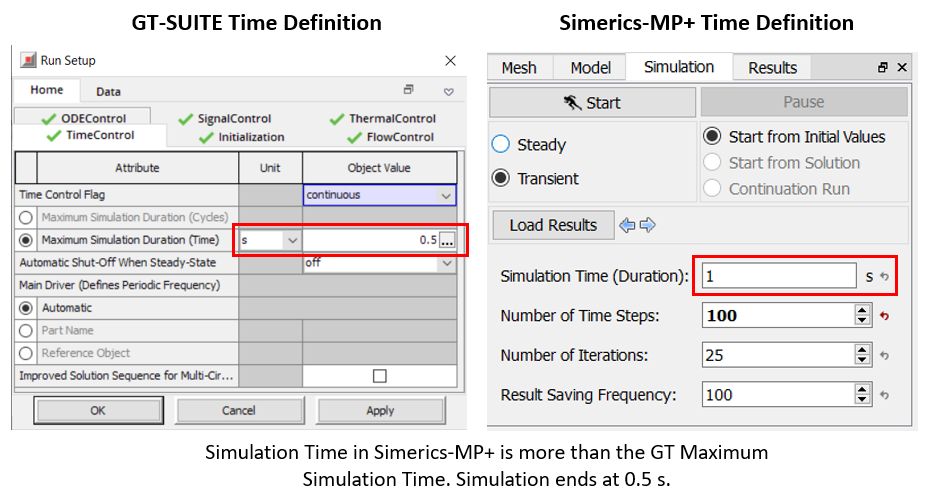
When the simulation is started in Simerics-MP+, the GT-SUITE co-simulation starts running. The total simulation time specified for the co-simulation in GT-SUITE is 0.5 s. The time before coupling with CFD is specified as 0.1 s, as shown in Time Definition. Hence, the CFD simulation runs for a physical time of 0.4 s. When GT-SUITE simulation is finished, Simerics-MP+ simulation is also terminated, and a prompt to save the result file appears after 40 out of 100 time steps (which corresponds to 0.4 s).