中文 English
You are here: Tutorials > Cavitation Over an Orifice > Setting up the model > Defining Physics and Conditions

Defining Physics and Conditions

The physics and conditions are specified as follows.

Add Modules
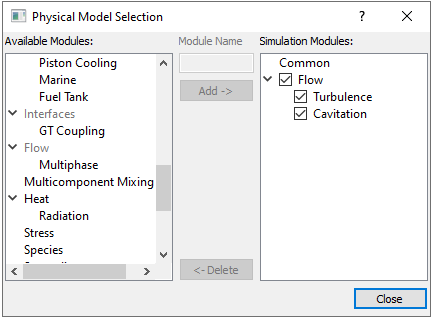
  1. Click Select Modules in the Model Panel. The Physical Model Selection dialog box opens.
  2. Select Flow, Turbulence and Cavitation under Available Modules list and click Add.
  3. Click Close to close the Physical Model Selection dialog box.
 

Figure 11.243 - Adding modules


  Note: If the same physical module is being added multiple times into the Simulation Panel, it is mandatory to enter the name of the additional module. After giving the additional module name under Module Name, it will add as a suffix to the default name of the module .


Operating Parameters
Flow
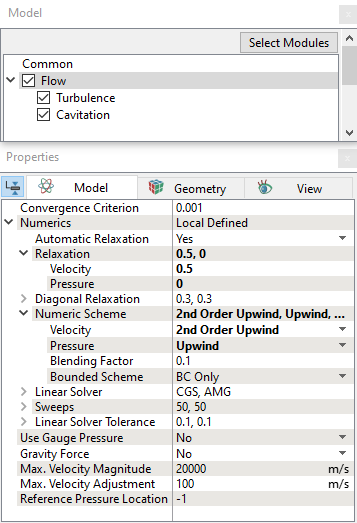
  1. Select Flow in the Model Panel.
  2. Enter 0.5 for Velocity and 0 for Pressure in the Relaxation drop-down list in the Model Tab of Properties Panel.
  3. Select 2nd Order Upwind for Velocity and Upwind for Pressure in the Numeric Scheme expanded list in the Properties Panel.


Figure 11.244 - Flow operating properties

Boundary conditions

The boundary conditions are specified as follows:

Inlet
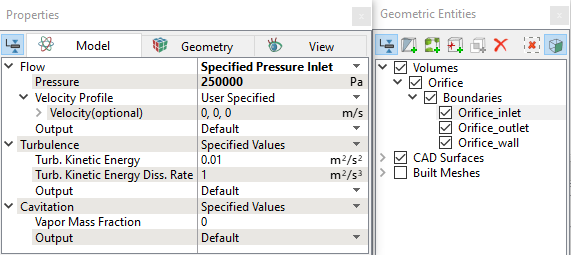
  1. Select Orifice_inlet from the Boundaries list in the Geometric Entities Panel.
  2. Select Specified Pressure Inlet from the Flow drop-down list in the Model Tab of Properties Panel.
  3. Enter 250000 Pa for Pressure under Flow.
 

Figure 11.245 - Inlet conditions


Outlet
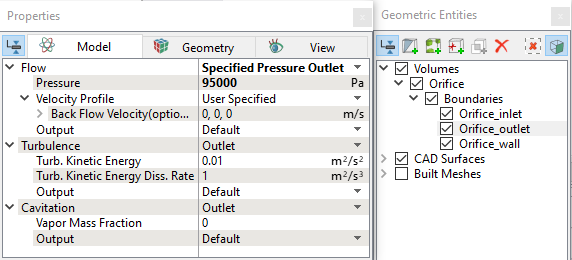
  1. Select Orifice_outlet from the Boundaries list in the Geometric Entities Panel.
  2. Select Specified Pressure Outlet from the Flow drop-down list in the Model Tab of Properties Panel.
  3. Enter 95000 Pa for Pressure under Flow.


Figure 11.246 - Outlet conditions


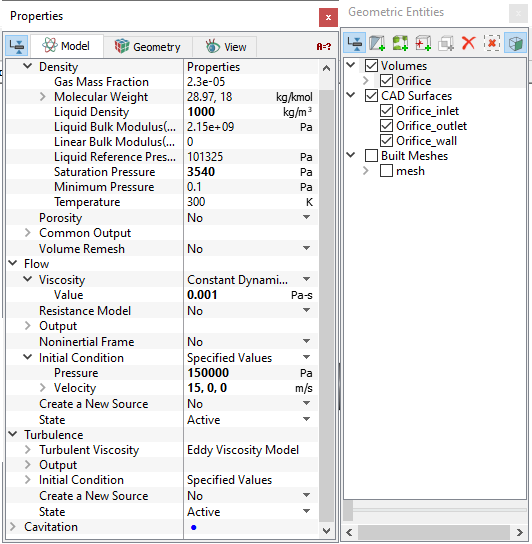
Fluid Properties
  1. Select Volumes list in the Geometric Entities Panel.
  2. Enter 1000 kg/m3 for Liquid Density and 3540 Pa for Saturation Pressure under Density for the Common list in the Model Tab of Properties Panel.
  3. Enter 0.001 Pa-s for Value under Viscosity for the Flow list.
  4. Enter 15,0,0 m/s for Velocity and 150000 Pa for Pressure under Initial Condition for the Flow.


Figure 11.247 - Fluid properties


Copyright © 2023 Simerics Inc.,