|
You are here: Tutorials > Cyclone Separator > Setting up the model > Defining Physics and Conditions
|
Defining Physics and Conditions
The physics and conditions are specified as follows.
Add Modules
|
Figure 11.7 - Adding modules |
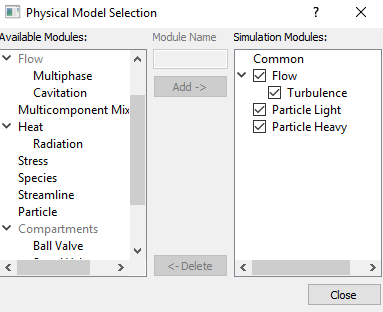
| Note: If the same physical module is being added multiple times into the Simulation Panel, it is mandatory to enter the name of the additional module. After giving the additional module name under Module Name, it will add as a suffix to the default name of the module . |
Light Particles
|
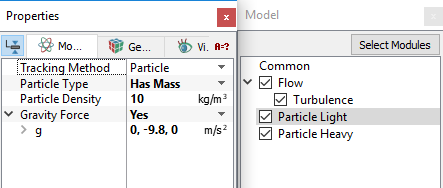
Figure 11.8 - Light particle properties |
Heavy Particles
|
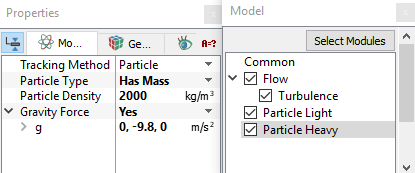
Figure 11.9 - Heavy particle properties |
Volume Properties |
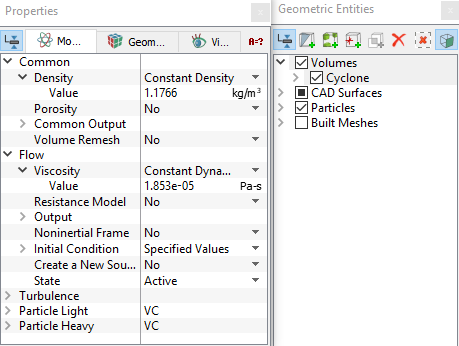
Figure 11.10 - Properties for air |
Boundary conditions
The boundary conditions for Air under Volumes are specified as follows:
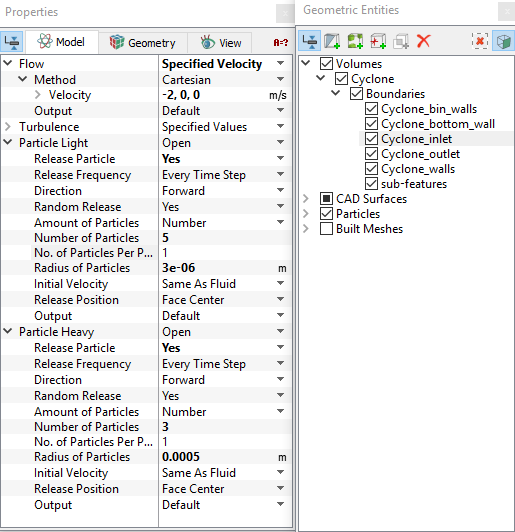
Cyclone Inlet
|
Figure 11.11 - Inlet conditions |
Outlet
|
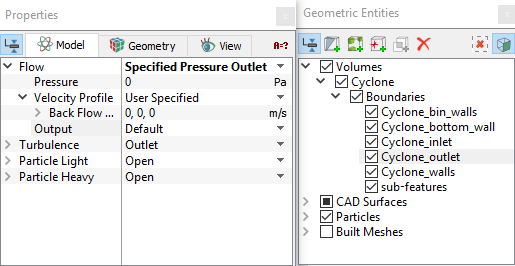
Figure 11.12 - Outlet conditions |
Walls
|
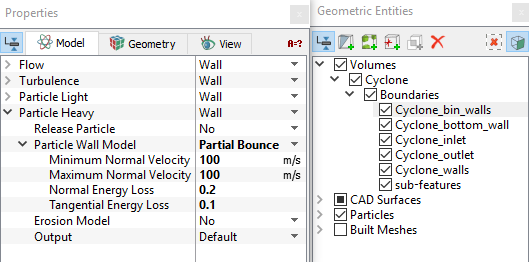 Figure 11.13 - Wall condition
|