11.9.3 Simulation
This section explains the settings to run the simulation for natural convection in a concentric annulus.
Create Monitoring Points
In natural convection simulation, the temperature variation along the radial direction is of interest. Hence, monitoring points are created in the radial direction. The steps to create the monitoring points are as follows:
- On the Geometric Entities Panel toolbar, click twenty times Create a Monitoring Point
 to create Points Point 01 to Point 20.
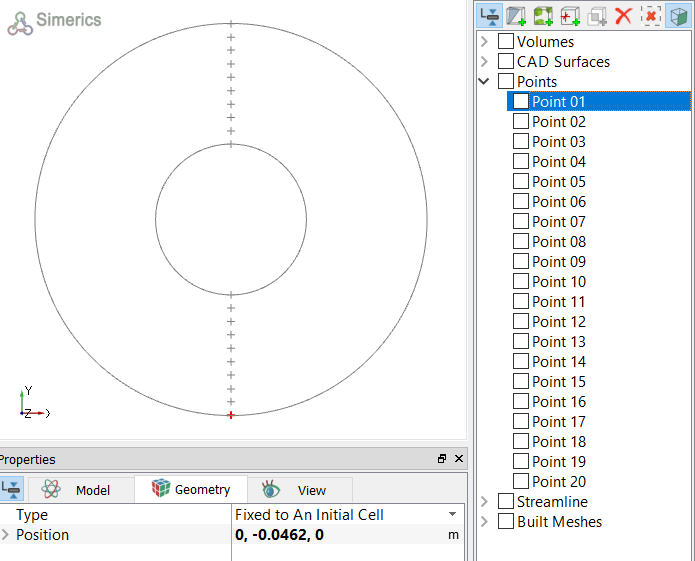
 - Select each point in the Geometric Entities Panel, and specify their Position values, as shown in Table 11.10 in the Geometry Tab of Properties Panel refer, Figure 11.211
| Points | Position values |
|---|---|
| Point 01 | 0, -0.0462, 0 |
| Point 02 | 0, -0.043, 0 |
| Point 03 | 0, -0.04, 0 |
| Point 04 | 0, -0.0367, 0 |
| Point 05 | 0, -0.0336, 0 |
| Point 06 | 0, -0.0304, 0 |
| Point 07 | 0, -0.0272, 0 |
| Point 08 | 0, -0.0241, 0 |
| Point 09 | 0, -0.0209, 0 |
| Point 10 | 0, -0.0178, 0 |
| Point 11 | 0, 0.0178, 0 |
| Point 12 | 0, 0.0209, 0 |
| Point 13 | 0, 0.0241, 0 |
| Point 14 | 0, 0.0272, 0 |
| Point 15 | 0, 0.0304, 0 |
| Point 16 | 0, 0.0336, 0 |
| Point 17 | 0, 0.0367, 0 |
| Point 18 | 0, 0.04, 0 |
| Point 19 | 0, 0.043, 0 |
| Point 20 | 0, 0.0462, 0 |
|
Note: Monitoring points need to be created before running the simulation for recording data, refer Figure 11.211 The position of a Points may also be dragged to a new location using the Select |
 in
in
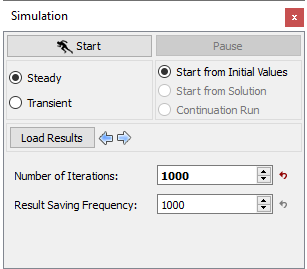
Steady Simulation Settings
|
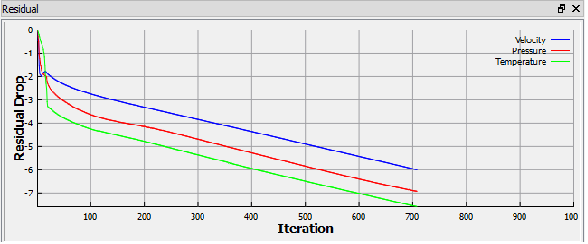
| Note: The result files are saved as .sres in the working folder. The result file will replace the preceding result depending on the Result Saving Frequency, till the residuals reach the desired convergence. |