|
You are here: Marine Templates and Tutorials > Marine Hull Template > Setting up the model > Building the Mesh
|
Building the Mesh
The mesh for the computational domain is created using the Marine Template Mesher.
|
The steps involved in the meshing are:
|
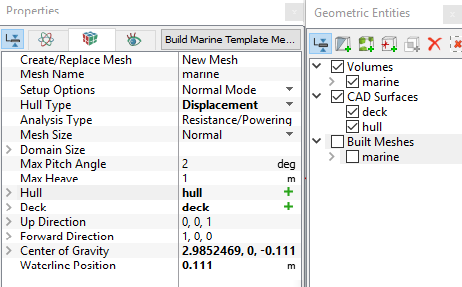
Figure 8.19 - Marine mesh settings |
 icon for
 Advanced Meshing
User Defined settings under Mesh Size in the Marine Template Mesher are used to control the advanced mesh features.
Wave Zone meshing
The wave zone meshing allows refinement of the wave zone to model and capture the Kelvin wave region in the marine simulation.
|
The wave zone for the refinement is specified using the following:
Once the wave zone is built, the following settings are described for the refinement. Cell Size of Wave Zone: The minimum domain cell size of wave zone. Total Levels of Refinements in Wave Zone: The total number of levels of refinement to transient from minimum domain cell size to maximum domain cell size. |
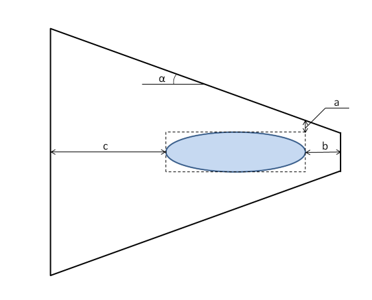
Figure 8.20 - Wave zone |
 . The length is relative to ship max dimension.
 , should be bigger than
  , relative to ship length.
 , relative to ship length.
Global Mesh RefinementThe global meshing settings allow refinement of the mesh sizes of the computational domain in the marine Computational Fluid Dynamics (CFD) simulation.
|
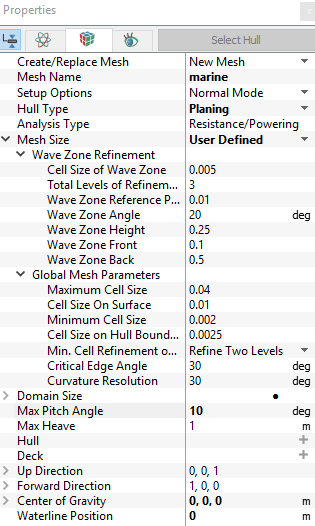
Figure 8.21 - Advanced meshing options |