Plots
The following plots are obtained using the Plot option for the Planing hull.
Velocity Curve
To obtain the plot for forward velocity:
- Select Marine in the Model Panel.
- Click Add XY-Plot
 icon in the Toolbar.
 - Click on Click for Variable List
 icon in Plot Panel toolbar, select Forward Velocity in the list.
 - Click Plot Selected Variables
 icon in the bottom left of Plot Panel.
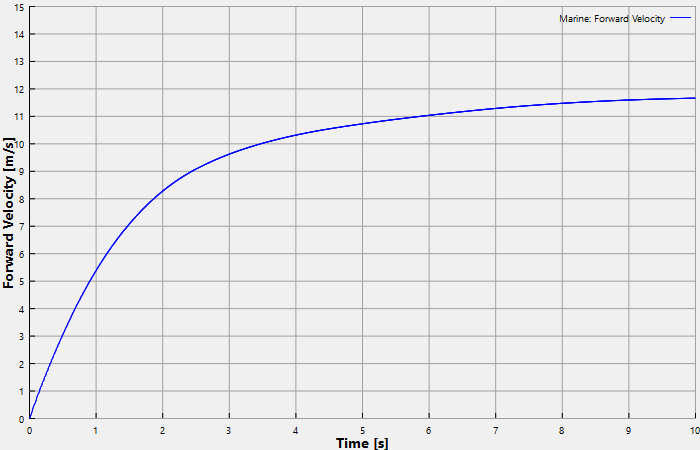
Figure 8.73 - Velocity curve
Power-Resistance Curves
To obtain the plot for power and resistance:
- Select Marine in the Model Panel.
- Click Add XY-Plot icon in the Toolbar.
- Click on Click for Variable List icon in Plot Panel toolbar, select Total Resistance in the list.
- Click Plot Selected Variables icon in the bottom left of Plot Panel.
- Select Effective Power in the same list.
- Click Plot Selected Variables icon in the bottom left of Plot Panel.
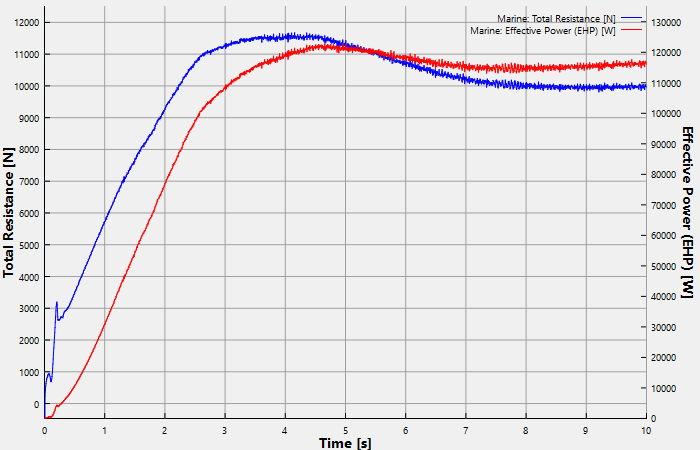
Figure 8.74 - Power-Resistance curves
Heave & Pitch curve
To obtain the plot for heave and pitch:
- Select Marine in the Model Panel.
- Click Add XY-Plot icon in the Toolbar.
- Click on Click for Variable List icon in Plot Panel toolbar, select Heave in the list.
- Click Plot Selected Variables icon in the bottom left of Plot Panel.
- Select Pitch in the same list.
- Click Plot Selected Variables icon in the bottom left of Plot Panel.
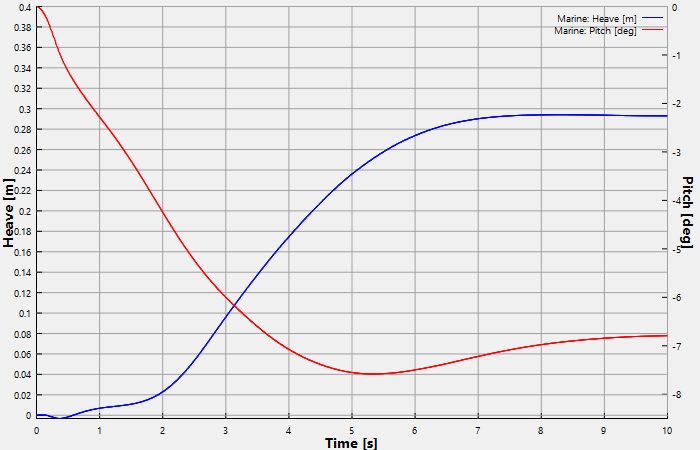
Figure 8.75 - Heave & Pitch curves