3.6 Simulation Panel
This panel lists the simulation control settings for steady and transient simulations. The following parameters are available in the Simulation Panel.
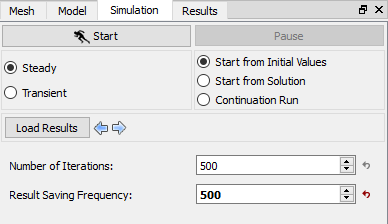
Figure 3.29 - Simulation panel-Steady |
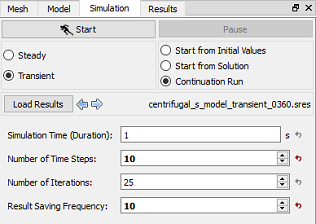
Figure 3.30 - Simulation panel-Transient |
Steady
A Time Definition option for an analysis, neglecting the effects of time is called Steady State Simulation. Some Transient processes, e.g. centrifugal impeller, can be approximated as a time-averaged, Steady-state process using the Moving Reference Frames.
Transient
- A Time Definition option for an analysis, including the effects of time. Certain problems are inherently Transient, including problems with time varying boundary conditions, moving parts, or instabilities, and can only be solved using the Transient option.
- Requires setting three additional parameters: Simulation Time (Duration), Number of Time Steps, and Result Saving Frequency.
|
Note: The Steady or Transient option can also be selected under the Common module in the Properties Panel of the Model Tab. |
Start/Stop: Used to initiate the solution of a simulation or stop an ongoing solution. The two keys alternate themselves.
Pause: Enables temporary suspension of a Steady or Transient simulation. Pause is a “toggle” switch, such that it is used to both pause and continue a simulation.
Start from Initial Values
- Enables the start of a solution using initial values. Initial values for each module are set on a volume by volume basis.
- For Steady problems, the selection of the initial values may impact the speed of convergence to the final answer but will not significantly affect the answer once the solution has converged.
- For Transient problems, the selection of the initial values corresponds to the values in the problem at time = zero and therefore would be expected to affect the answer at a later time, with the exception of a periodic solution, where the initial values would eventually “wash out.”
Start from Solution
- Enables the start of a Steady or Transient simulation using solution results from a previous simulation.
- Steady results are used to Start from Solution for a Transient simulation (and vice-versa), as long as the grid files are compatible (one-to-one).
Continuation Run
- Enables the uninterrupted continuation of a Steady or Transient simulation, as if the simulation had never been stopped.
- Requires that data has been loaded (see Load Results).
Number of Iterations
- To limit the iterations for a case when convergence is taking longer than desired, but at the cost of a loss of accuracy.
- The solution process in Simerics-MP is iterative. The user can limit the total number of iterations for a Steady simulation or total number of iterations per time-step for a Transient simulation by setting the Number of Iterations to the desired number.
- When the Number of Iterations is attained, the code will stop (Steady) or move to the next time-step (Transient).
- The Number of Iterations should be sufficiently large to allow the Converge Criterion for all modules to be satisfied.
Results Saving Frequency
- Determines the frequency of the output of the results file (.sres) for a Transient simulation.
- Only applies to Transient simulations and controls the output frequency for Additional Output Files.
- For a Steady solution, a results file with the name: Filename.sres is output upon completion of the run.
Simulation Time (Duration)
- The duration, in seconds, of a Transient simulation and combined with the Number of Time Steps dictates the size of the time-steps.
- For a rotating system, degrees of rotation per time-step is related to the Simulation Time (Duration) based on the following formula:

|
3.1 |
|
Note: The value of the Simulation Time (Duration) may also be set under the Common module in the Properties Panel of the Model Tab |