Interface Conditions
|
The interface conditions and associated Heat parameters can be specified as follows: |
Figure 5.146 - Heat interface conditions |
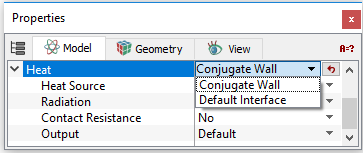
Conjugate wall
This allows to include Heat Source, Radiation and the effect of small gaps (Contact Resistance).
The Conjugate Wall uses a harmonic averaging of the effective conductivity at an Interface. Harmonic averaging is required for accurate calculation of the heat flux between materials with different conductivities. This is the default condition at any interface separating a liquid and solid.
Heat Source
|
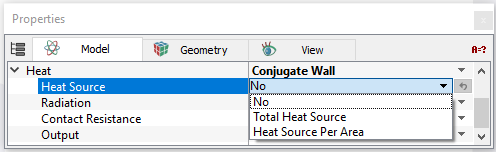
This allows the introduction of a Heat Source at an Interface. This source can be added as Total Heat Source as Total Flux or Heat Source Per Area as Flux Per Area. This is distributed to either side of the interface based on the respective thermal properties of the neighboring cells. The Heat Source at an Interface can be used in conjunction with the Radiation option but not with the Contact Resistance. |
Figure 5.147 - Heat source options |
Radiation
|
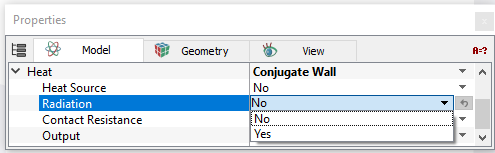
The radiative Heat Source is distributed to either side of the Interface based on the respective thermal properties of the neighboring cells. This requires specifying the values for Emissivity and Radiation Ambient Temperature. The Radiation option at an Interface can be used in conjunction with the Heat Source option but not with the Contact Resistance. |
Figure 5.148 - Radiation options |
Contact Resistance
|
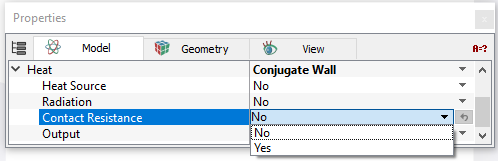
This setting models the effect of a thin gap or layer of material at an Interface between two materials. User can specify the gap thickness and the conductivity of the material. Contact Resistance is useful for including the effects of very small gaps between objects, without the expense or complication of a very fine mesh in between. This resistance only includes the effect of conductivity across the thickness of the gap. It does not include the effect of any lateral conduction. This cannot be used in conjunction with the Heat Source and Radiation option. |
Figure 5.149 - Contact resistance options |
Default Interface
This is the default option for an Interface connecting similar materials and can also be used for the Interface between dissimilar materials. For the Default Interface option, the conductivity at the interfaces between the cells uses a simple linear average. It has the advantage of simplicity and speed but is not accurate if there is a sharp change in conductivity across the interface. For such interfaces, the user should instead specify the Conjugate Wall condition. Despite its name, this is not necessarily the default choice for the interface between the cells. For example, the interface between a solid and fluid is automatically set by default, as a Conjugate Wall.