中文 English
You are here: Physics Modules > Heat > Conditions > Source

Source

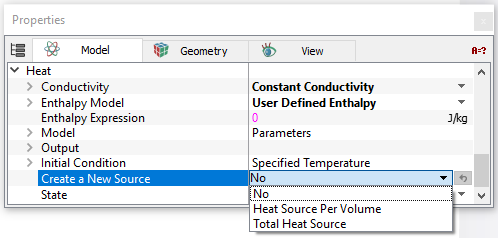
The Source is a volume condition in the Heat module pertaining to selected Volumes. To specify the source, click Create a New Source in the Heat module as follows:


Geometric Entities Panel > Volumes > [Desired Volume]

Properties Panel>Model Tab > Heat> Create a New Source> [Desired selection]


A Source listing appears under the Heat module in the Properties Panel whenever a source has been created using Create a New Source. The possible Heat sources for a selected volume are:


Figure 5.134 - Create a source

Source Per Volume

Energy is introduced into a selected volume as a Heat Source Per Volume (W/m3).

Total Source

Energy is introduced into a selected volume as a Total Heat Source (W).

Remove This Source

This removes an existing energy source in a selected Volume.


Note: If no source has been created, the Source heading is not visible. Multiple sources are numbered sequentially, e.g. Source 1, Source 2, Source 3, etc. If a source is removed, the remaining sources are renumbered starting from 1.


Copyright © 2023 Simerics Inc.,