5.5 Multiphase
In many natural occurrences and engineering systems, the flow of interest often concerns multiple fluids with different materials/sizes, and/or physical states (gas, liquid and solid). Two typical examples are the water cycle in the atmosphere, and the water-air bubbly flows in bubble columns. In such situations, the water-vapor and water-air systems are commonly referred to as two-phase/two-fluid flows, where each phase acts as a single fluid flow, and the phase-to-phase interactions cause interphase exchanges of momentum, mass and heat.
Multiphase flows may be grouped into four categories: gas-liquid flows, gas-solid flows, liquid-solid flows and gas-liquid-solid three phase flows. With each group, the flow characteristics can be further divided into different flow regimes. For example, for a gas-liquid flow, the flow regime can be bubbly flow (discrete gaseous bubbles in the continuous liquid phase), droplet flow (discrete liquid droplets in the continuous gas), slug flow (large gaseous bubbles in the continuous liquid) and stratified/free-surface flow (gas-liquid immiscible and separated by a clearly-defined interface). Given the complex and diverse nature of the multiphase flows, it is impractical to have a universal modelling approach that applies for all multiphase flow regimes. Indeed, the first step for solving a multiphase problem is to determine the flow category and regime, and then choose an appropriate modelling approach (both physical models and solver method) that best represents the multiphase flow considered.
Currently, there are two approaches for the numerical simulation of multiphase flows: the Euler-Lagrange approach (see Discrete Particle Module), and the Euler-Euler approach. The latter is generally referred to as Eulerian Multiphase model, and it is the focus of the Multiphase module in Simerics-MP.
|
To activate the Multiphase module:
|
Figure 5.96 - Multiphase module |
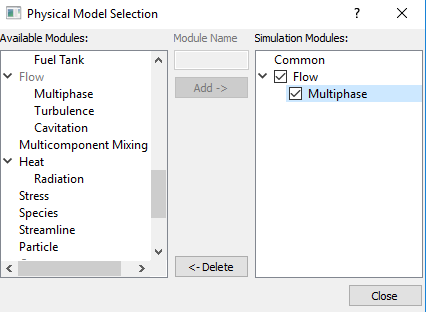
The module is explained as follows:
- Definitions: Terminologies relevant to the Multiphase module.
- Physics: Models, methods and constants used in the Multiphase module.
- Conditions: Specifying conditions for the entities-boundaries, interfaces, volumes under the Multiphase module.
- Output Variables: Outputs from the Multiphase module.