5.10.5 Particle Output
The options to view the Particle in the output are available in the Properties Panel and the Plot Panel. They can be categorized as:
- Display Window
- Plot Window: Module outputs and for the boundary outputs.
Display Window
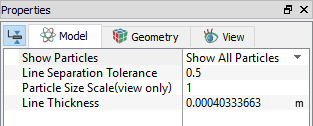
The output variables can be seen in terms of the particle distribution in the display window over the entire fluid domain. The particle parameters in the Properties Panel can be specified as follows:
|
The parameters for the particle display are:
|
Figure 5.244 - Particle module - Display properties |
Plot Window
Module
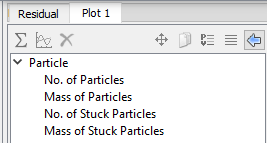
The module related parameters for particles in the Plot Panel are specified as follows:
- Model Panel > Particle
- Plot Panel > Particle > [Desired Property]
|
The plot parameters for the module are as follows:
|
Figure 5.245 - Particle module - Plot properties |
Boundary
The particle parameters for boundaries in the Plot Panel are specified as follows:
- Geometric Entities Panel > Boundaries > [Desired Boundary]
- Plot Panel > Particle > [Desired Property]
The parameters available for plotting differ based on the boundary condition and the release condition selected using Release Particle . They also differ for Massless and Has Mass particles.
When Release Particle is set to Yes for a boundary, the following parameters are available in the Plot Panel:
| Open | Wall | Symmetry | |
|---|---|---|---|
| Massless |
No. of Released Particles No. of Released Particles Per Step No. of Exited Particles No. of Exited Particles Per Step |
No. of Released Particles No. of Released Particles Per Step |
No. of Released Particles No. of Released Particles Per Step |
| Has Mass |
No. of Released Particles No. of Released Particles Per Step Released Mass Flux No of Exited Particles No. of Exited Particles Per Step Exited Mass Flux |
No. of Released Particles No. of Released Particles Per Step Released Mass Flux No. of Bounced Particles No. of Hit Particles Hit Particle Mass Flux Hit Particle Mass Hit Energy (Normal) Hit Energy (Tangential) No. of Stuck Particles Stuck Mass Flux Mass of Stuck Particles Erosion Mass Erosion Thickness Erosion Mass Rate Erosion Speed |
No. of Released Particles No. of Released Particles Per Step Released Mass Flux |
Table 5.48 - Release particle as Yes
When Release Particle is set to No for a boundary, the following parameters are available in the Plot Panel:
| Open | Wall | Symmetry | |
|---|---|---|---|
| Massless |
No. of Exited Particles No. of Exited Particles Per Step |
- |
- |
| Has Mass |
No. of Exited Particles No. of Exited Particles Per Step Exited Mass Flux |
No. Hit Particles |
- |
Table 5.49 - Release particle as No
Variables for Contours
The following variables are available for the Particle module in the Results Panel to be displayed as contours :
| Flow Module Primary Variables | ||
|---|---|---|
| Label in Results Panel Variables List | Units | Display/Output Options |
| Particle Number Density | 1/m2 | In the GUI Display Window |
| No. of Particles Per Face | - | In the GUI Display Window |
| Erosion Thickness | m | In the GUI Display Window |
| Erosion Weight | kg/m2 | In the GUI Display Window |
Table 5.50 - Contour variables