Boundary Conditions
|
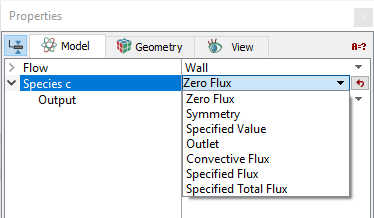
The boundary conditions and related Species parameters are specified as follows: |
Figure 5.205 - Boundary condition |
Zero Flux
For a user-defined species/scalar, Zero Flux is used as a boundary condition when its normal gradient to the boundary is zero or negligible. For a fluid zone (volume), Zero Flux is the default species boundary condition on a wall surface.
Symmetry
For a symmetry boundary, zero-flux/zero-gradient condition automatically applies for the species. This boundary condition usually corresponds to the physical symmetry in the model.
Specified Value
|
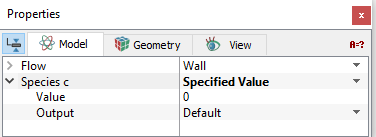
This is used on boundaries where the value of the species is a known quantity, either as a constant or function defined through the Expression Editor. This boundary condition usually corresponds to the physical inlet boundary in the model, where the typical Flow boundary condition is Specified Velocity, Specified Volumetric Flux, Specified Total Pressure, or Specified Pressure Inlet. Note that if the species is entering the domain, the specified value is applied for the boundary, while zero flux condition is actually used if the species is leaving the domain from the boundary.
|
Figure 5.206 - Specified value |
Outlet
This is used at an opening where the species flow is expected to exit the domain. This boundary condition usually corresponds to the physical outlet boundary (e.g. with flow boundary conditions as Specified Pressure Outlet or Resistor Capacitor) in the model. In an Outlet, zero flux is the default condition, while the specified value is applied if the species is entering the domain for the boundary.
Convective Flux
|
Convective Flux applies for a boundary where the Exchange Coefficient and Ambient Value (Concentration) of the species are known. The boundary value of |
Figure 5.207 - Convective flux |
 is obtained from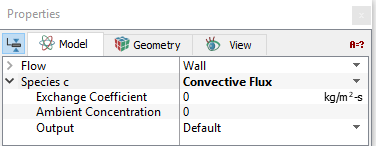
Specified Flux
|
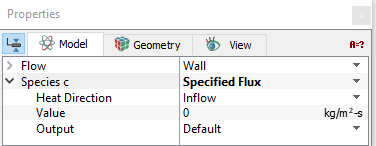
The option allows users to specify the flux per unit area (flux per area is known), either as a constant or a function using the Expression Editor .The direction of flux can be determined by one of the three options: |
Figure 5.208 - Specified flux |
Specified Total Flux
|
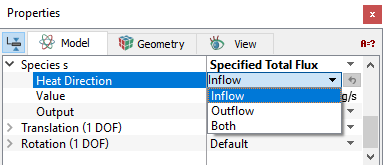
This option allows users to specify the total flux of the species across the boundary. The flux per area is computed by the solver, and it is then treated in the same way as the Specified Flux condition. |
Figure 5.209 - Specified Total Flux |
Interface Conditions
The interface attributes for the Species module are the same as for the boundary conditions, if and only if the volume on one side of the Interface has been Blanked for Species. If the Species module is Active on both sides of an interface, then no boundary conditions are required at the Interface.