Source
|
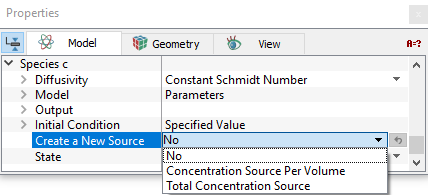
The Source is a volume condition for a species pertaining to selected Volumes. To specify the source, click Create a New Source (see Figure 5.204) as follows:
Under Create a New Source, Simerics-MPoffers three options:
|
 ).
). ).
).
|
Note: Multiple sources are numbered sequentially, e.g. Source 1, Source 2, Source 3, etc. If a source is removed, the remaining sources are renumbered starting at 1. |
Initial Condition
The Initial Condition is a volume condition in the Species module pertaining to selected Volumes. To specify Initial Condition in Species module:
- Geometric Entities Panel > Volumes > [Desired Volume]
- Properties Panel > Model Tab > Species [Name] > Initial Condition
This refers to the values of the independent variables used to start a simulation when the Start from Initial Values option is selected in the Simulation Panel. For the Species module, the initial value of scalar,  can be specified for each volume under Specified Value.
State
Under the Species module, the State of a volume determines whether the scalar transport equation is solved (Active) or not solved (Blanked) over the volume. Setting the State of a volume to Blanked is equivalent to freezing the species at its initial value. The State is specified as follows:
- Geometric Entities Panel > Volumes > [Desired Volume]
- Properties Panel > Model Tab > Species [Name] > State > [Active or Blanked]
|
Note: For a selected volume, the State in the Species module is independent of its state in other modules. For example, if the Flow module is set to Blanked (i.e. making a volume solid), the Species module can be either Active or Blanked. |