5.9.4 Output Variables
This section explains the output available in the Species module. They are categorized as follows:
|
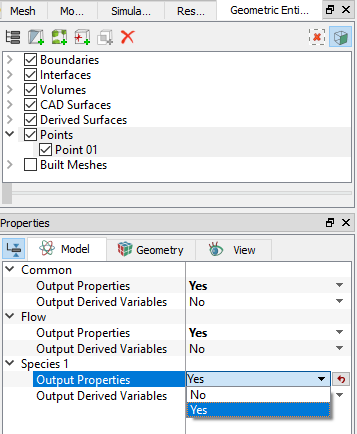
Note: In order to display the contours and X-Y plots, or to write the outputs into an ascii file, the outputs on each Geometric entity (such as Boundary, Volume, Interface or Points) need to be activated in the Model Tab of the Properties Panel. |
Primary Variables
Primary Variables are the fundamental variables that characterize the physical process in the module. They are usually obtained by directly solving transport equations or through physical constitutions. The primary variables can be displayed in the GUI Viewing Window for selected Geometric Entities as well as written to the ascii file Filename_points.txt. They can also be viewed as X-Y Plots for Point Probes.
For the Species module, a list of Primary Variables is shown in the table below:
| Species Module Primary Variables | |||||
|---|---|---|---|---|---|
| Label in Results Panel Variables List | Label in GUI X-Y Plot Menu | Label in points.txt | Definition | Units | Display/Output Options |
| Concentration | Concentration | Species_Name | Concentration | - | At a Point and in the GUI Display Window |
Table 5.39 - Species module primary variables
Primary Variables are automatically activated for selected Geometric Entities, including Boundaries, Derived Surfaces, Interfaces, Streamline, Particles and/or Volumes, depending on the modules selected.
Property Variables
Property Variables are the physical properties for the fluid(s) and solid(s) in the domain. They are required as a part of the solution. They can be displayed in the GUI Viewing Window for selected Geometric Entities and are also written to the ascii file Filename_points.txt (when activated). They can also be viewed as X-Y Plots for Point Probes.
The list of the physical properties for the Species module is shown below:
| Species Module Physical Properties | |||||
|---|---|---|---|---|---|
| Label in GUI Variables List | Label in GUI X-Y Plot Menu | Label in points.txt | Definition | Units | Display/ Output Options |
| Diffusivity | Diffusivity | D_[Species Name]_ | Diffusivity | kg/m-s | At a Point and In the GUI Display Window |
Table 5.40 - Species module property variables
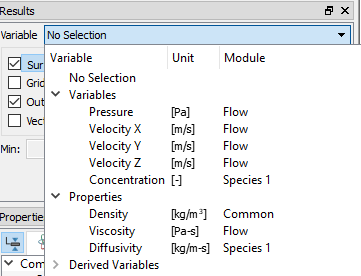
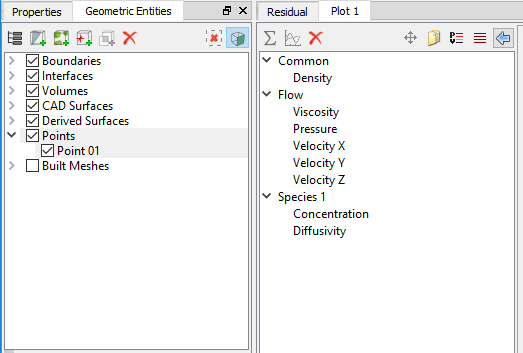
As shown in Figure 5.211, Property Variables are automatically activated for output on selected Geometric Entities, including Boundaries, Derived Surfaces, Interfaces, Streamline, Particles and/or Volumes, depending on the modules selected. For Point Probes, however, explicit activation is required. The X-Y plots are displayed in Figure 5.212 and Figure 5.210, respectively.
Integrated Quantities
An Integrated Output is the averaged or total value of a variable over a Boundary, Interface or Volume. When available and activated, the integrated quantities can be stored in the ascii file Filename_integrals.txt as well as be displayed in the GUI using X-Y Plots.
To access the variables listed below using expressions, the syntax given under Expressions column in Table 5.41 is used with a suffix “@boundary or volume name” such as specmass = species._.s_m_tot@pipe.
A table of the Integrated Quantities for the Species module is shown below:
| Species Module Integrated Quantities | ||||||
|---|---|---|---|---|---|---|
| Label in GUI Properties | Label in GUI Plot Menu | Label in integral.txt | Definition | Units | Application | Expressios |
| Average Concentration | Concentration | s_ | Area Averaged Concentration | - | Boundary | species[.subname].s |
| Mass Average Concentration | Mass Average Concentration | ms_ | Mass Averaged Concentration | - | Boundary | species[.subname].ms |
| Vol Avg Concentration | Concentration | s_ | Volume Averaged Concentration | - | Volume | species[.subname].s |
| Species Mass | Species Mass | s_m_tot_ | Total Mass | kg | Volume | species[.subname].s_m_tot |
| Mass Avg Concentration | Mass Average Concentration | ms_ | Area Averaged Concentration | - | Volume | species[.subname].ms |
For a selected Geometric entity, the Integrated outputs must be explicitly activated as shown in Figure 5.213.
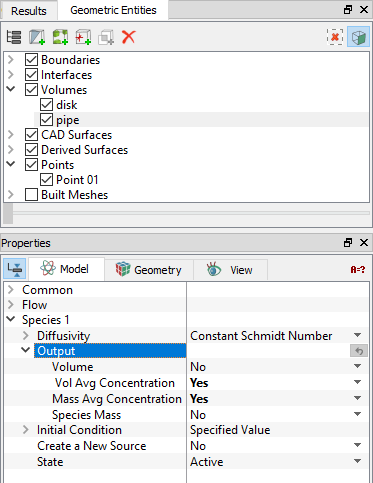
Figure 5.213 - Output activation-Integrated quantities