5.11.1 Physics
Determination of Streamlines
To create flow streamlines, the motion of massless particles is tracked based on the solved flow field, specified streamline boundary and release conditions. In this section, the method adopted in Simerics-MP to create streamlines is described in detail.
Particle Equation of Motion
To track the particle motion, the trajectory equations of each particle are solved (integrated) either analytically or numerically. For a massless particle moving along with the local flow field, the motion equation may be rewritten as:

|
where  is the position vector of the particle; and the particle velocity
  is the same as the flow velocity at the location
  . The trajectory of
  in the flow domain is then a flow streamline.
Boundary Conditions
 Description
Simerics-MP applies a streamline boundary condition to determine the behavior of flow streamlines at a boundary. When streamlines are at a boundary of the flow domain (including external boundaries and solid-fluid interfaces), for example a wall or an inlet boundary, one of several scenarios may occur at the boundary:
- The streamlines may be reflected.
- The streamlines may enter, leave or both enter and leave through the boundary.
- The streamlines may pass through an internal boundary zone, such as fan or porous jump.
Based on the streamline behavior at the boundaries, the flow boundary conditions and flow-solid interfaces are regrouped into three types of streamline boundary conditions: Open, Symmetry and Wall.
Open Streamline Boundary
Open streamline boundary condition allows streamlines to exit, enter, or both exit and enter the computational domain. An open boundary is usually an inlet or outlet boundary of the fluid flow, but it can also apply to the other types of flow boundaries such as wall and symmetry. At an open boundary, the streamline can either leave from or enter into the domain depending on the particle (flow) velocity direction.
Let  be the unit normal vector to the open boundary which points in the direction away from the computational domain, with the particle boundary velocity
  (the same as the flow velocity at the point) we have the following streamline conditions at the open boundary:
- If
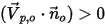 , the velocity vector
  points away from the computational domain, indicating that the particle/flow escapes through the boundary. The particle is then lost from the flow domain at the point of impact with the boundary.
 - If
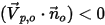 , the velocity vector
  points to the computational domain, indicating that the particle/flow enters into the domain from the boundary. This particle is released/injected into the fluid flow from the open boundary along with the inflow. The particle is a part of the streamline calculation at the point of impact with the boundary.
Symmetry Streamline Boundary
At a streamline symmetry boundary, the streamlines are reflected at the boundary. For streamlines, a symmetry boundary typically corresponds to the flow symmetry. It can also be a location for particle release/escape in the same way as in the open streamline boundary.
Let  be the normal-to-symmetry unit vector at point “
 ” of the symmetry boundary, with its direction pointing away from the symmetry towards the computational domain. Further,
  and
and  are introduced to indicate the angle of the particle impact velocity (local flow velocity) at the symmetry streamline boundary, as shown in Figure 5.247. With the particle reflecting from the symmetry boundary, the tangential velocity remains the same while the normal velocity component only changes the sign. Mathematically, the particle/streamline symmetry boundary condition can be expressed as:

|
where  and
and  are the particle reflecting velocity and angle at the point “
 " of the symmetry boundary respectively; and
  and
and  represent the velocity magnitudes.
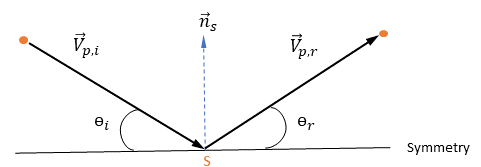
Note that since the massless particles travel at the local flow velocity, which is obtained by flow simulations, no boundary condition is required when equation 5.566 is integrated at a streamline symmetry boundary.
Wall Streamline Boundary
For streamlines, a wall streamline boundary typically corresponds to the wall flow boundary. At a streamline wall boundary, the massless particles move with the fluid flow. Since the local flow velocity, thus the particle velocity, is obtained using the appropriate near-wall models, no explicit wall boundary condition is required to solve equation 5.566.
It may also be noted that the streamline wall boundaries can be the external walls and fluid-solid interfaces. As in the open and symmetry streamline boundaries, a wall streamline boundary can also be served as a location for particle releases.
Particle Release
Releasing particles from a specified streamline boundary provide the initial conditions and values for the streamlines. As in the Lagrange particle tracking, the procedure to determine initial conditions involves particle releases (direction, location, number of the particles and distributions) from boundaries (open, symmetry, wall and interface), and assigning properties for each particle.
Note that for streamlines, the initial velocity of each massless particle  , at its release position
  is automatically set to be the same as the local flow velocity,
  . In Simerics-MP, the release of streamline particles is controlled using the Release Particle feature.
Animation of Streamlines
To create and visualize the flow streamlines as "noodles", the trajectory equation of each particle, equation 5.566, is solved (integrated) numerically. With the flow solutions, the particle/flow velocity field is known, and the particle displacement can be calculated using the forward Euler integration of the particle velocity over the Animation Time Size,  :
:

|
where the superscripts ( ) and
) and  refer to the new and current values respectively, and
  is the particle (local flow) velocity. At the first time-step,
  and
and  are the release position and the release velocity, respectively:

|
Note that the user-specified animation time-step  is a real number multiplier used to animate the streamlines. A value of 1 indicates that the animation “noodles” are the same as the local velocity. The value of
  changes the “noodle” flow speed to “
 ” times the local flow velocity.
It may also be noticed that the diameter of the streamline “noodles” can be specified by a user-parameter, Line Thickness. The length of a streamline “noodle” is equal to the local velocity multiplied by the animation time-step:  . In addition, to prevent the streamline tracking procedure from spending excessive amount of computational time for tracking a streamline that is either looping or stagnant, a user-input, “Maximum Integral Steps”, is introduced to limit how far the streamline algorithm would be used to track a streamline. A smaller number would reduce the computing time, but a very small value may end a streamline too earlier than desired.