Initial Condition and Source
Initial Condition
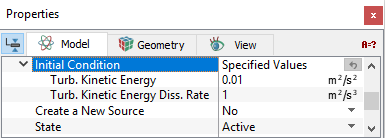
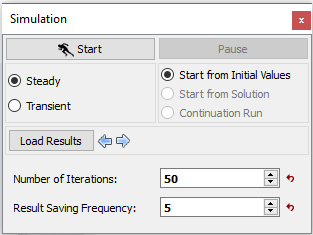
Initial Condition refers to the values of the independent variables used to start a simulation when the Start from Initial Values option is selected in the Simulation Panel as shown in Figure 5.60. For the Turbulence module, the initial Turbulent Kinetic Energy and the Turbulent Energy Dissipation Rate fields can be specified for each volume.
Turbulent Kinetic Energy (TKE)
The initial TKE for a selected volume can be specified using the Initial Condition: Specified Values parameter. The default initial TKE is 0.01.
Turbulent Kinetic Energy Dissipation Rate (TKEDR)
The initial TKEDR for a selected volume can be specified using the Initial Condition: Specified Values parameter. The default TKEDR is 1.
Source
|
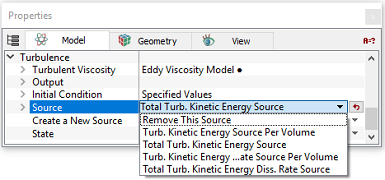
The Source is a volume condition in the Turbulence module pertaining to selected Volumes. To specify the source, click Create a New Source in Turbulence module as follows:
Create a New Source allows the introduction of a TKE source and TKEDR source into a selected volume. |
Figure 5.61 - Source |
Turbulent Kinetic Energy (TKE) Source
A TKE source may be introduced as a source per volume or total source.
A positive Value of either the TKE Source Per Volume (kg/m-s3) or the TKE Source (kg-m2/s3) will add TKE to the volume. A negative Value will remove it.
Turbulent Kinetic Energy Dissipation Rate (TKEDR) Source
A TKEDR may be introduced as a source per volume or total source.
A positive Value of either the TKEDR Source Per Volume (kg/m-s4) or the TKEDR Source (kg-m2/s4) will add TKEDR to the volume. A negative Value will reduce it.
Remove This Source
This allows the removal of a TKE source and/or TKEDR source from a selected Volume.
|
Note: If no source has been created, the Source heading is not visible. Multiple sources are numbered sequentially, e.g. Source 1, Source 2, Source 3, etc. If a source is removed, the remaining sources are renumbered starting at 1. |
State
The State of a Volume within the Turbulence module determines whether velocity and pressure are solved (Active) or not solved (Blanked) within that volume. The Turbulence field within a Blanked volume will be left as the Initial Condition.