


Click the drop-down arrow  to select a function from the drop-down list. The table
below outlines the available quantitative functions.
to select a function from the drop-down list. The table
below outlines the available quantitative functions.
|
Function Name |
Operation |
|---|---|
|
Area of location | |
|
Area-weighted average | |
|
Area-weighted integral (can be projected to a direction) | |
|
Arithmetic average | |
|
Number of calculation points | |
|
Length of a curve | |
|
Length-weighted average | |
|
Length-weighted integration | |
|
Maximum Value | |
|
Minimum Value | |
|
Value at a point | |
|
Sum over the calculation points | |
|
Volume of a 3D location | |
|
Volume-weighted average | |
|
Volume-weighted integral |
The area function is used to calculate the area of a
2D location. The following example demonstrates use of the function.
Function:
area, Location:Plane1. This example calculates the total area of the locatorPlane1.
The areaAve function calculates the area-weighted
average of an expression on a 2D location. The area-weighted average of a
variable is the average value of the variable on a location when the mesh
element sizes are taken into account. Without the area weighting function,
the average of all the nodal variable values would be biased towards
variable values in regions of high mesh density. The following examples
demonstrate use of the Function.
Function:
areaAve, Location:Outlet, Variable:Velocity. This example calculates the average magnitude of the velocity on theoutletlocation. Note that flow direction is not considered since the magnitude of a vector quantity at each node is calculated. Use the scalar components of velocity (for example,Velocity u) to include a directional sign, for example:Function:
areaAve, Location:Outlet, Variable:max(Velocity u, 0.0[m s^-1]). This example calculates the area-weighted average value ofVelocity u, with negative values of the variable replaced by zero. Note that this is not the average positive value since zero values contribute to the average.
The areaInt function integrates a variable over the
specified 2D location. To perform the integration over the total face area,
the None option should be selected from the Direction
drop-down list. If a direction is selected, the result is an integration
over the projected area of each face onto a plane normal to that direction.
Each point on a location has an associated area that is stored as a vector
and therefore has direction. By selecting a direction in the calculator you
are using only a single component of the vector in the area-weighting
function. Since these components can be positive or negative, depending on
the direction of the normal on the location, it is possible for areas to
cancel out. An example of this would be on a closed surface where the
projected area is always zero (the results returned are not in general zero
since the variable values differ over the closed surface). On a flat surface
the normal vectors always point in the same direction and never cancel out.
The following examples demonstrate use of the function.
Function:
areaInt, Location:Plane1, Variable:Pressure, Direction:NoneThis example integrates pressure over Plane1. The result returned is the total pressure force acting on Plane1. The magnitude of each area vector is used and so the direction of the vectors is not considered.Function:
areaInt, Location:Plane1, Variable:Pressure, Direction:Global X. This example integrates pressure over the projected area of Plane1 onto a plane normal to the X axis. The result is the pressure force acting in the X direction on Plane1. This differs slightly from using the force function to calculate the X-directional force on Plane1 — the force function includes forces due to the advection of momentum when calculating the force on an internal arbitrary plane or a non-wall boundary (such as inlets).
The ave function calculates the arithmetic average
(the mean value) of a variable or expression on the specified location. This
is the sum of the values at each node on the location divided by the number
of nodes. Results are biased towards areas of high nodal density on the
location. To obtain a mesh-independent result, use the
lengthAve, areaAve,
volumeAve or massFlowAve
functions. The following example demonstrates use of the function.
The average of a vector value is calculated as an average of its
magnitudes, not the magnitude of component averages. As an example, for
velocity, 
where 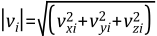
Function:
ave, Location:MainDomain, Variable:Temperature. This example calculates the mean temperature at all nodes in the selected domain.
The count function returns the number of nodes on the
specified location. The following example demonstrates use of the
function.
Function:
count, Location:MainDomain. This example returns the number of nodes in the specified domain.
Computes the length of the specified line as the sum of the distances between the points making up the line. The following example demonstrates use of the function.
Function:
length, Location:Polyline1. Calculates the length of the Polyline.
Computes the length-based average of the variable on the specified line. This is the 1D equivalent of the areaAve function. The result is independent of the nodal distribution along the line since a weighting function assigns a higher weighting to areas of sparse nodal density. The following example demonstrates use of the function.
Function:
lengthAve, Location:Polyline1, Variable:Velocity. This calculates the average velocity on the location Polyline1 using a length-based weighting function to account for the distribution of points along the line.
Computes the length-based integral of the variable on the specified line. This is the 1D equivalent of the areaInt function. The following example demonstrates use of the function.
Returns the maximum value of the specified variable on the specified locator. Create a user variable if you want to find the maximum value of an expression. The following example demonstrates use of the function.
Function:
maxVal, Location:Default, Variable:Yplus. This returns the maximumYplusvalue on theDefaultwall boundaries.
Returns the minimum value of the specified variable on the specified locator. Create a user variable if you want to find the minimum value of an expression. The following example demonstrates use of the function.
Function:
minVal, Location:MainDomain, Variable:Temperature. These settings return the minimum temperature in the domain.
Returns the value of the specified variable on the specified point object. The following example demonstrates use of the function.
Function:
probe, Location:Point1, Variable:Density. Returns the density value atPoint1.Important: This calculation should only be performed for point locators described by single points. Incorrect solutions are produced for multiple point locators.
Computes the sum of the specified variable values at each point on the specified location. The following example demonstrates use of the function.
Function:
sum, Location:SubDomain1, Variable:Volume of Finite Volume. Returns the sum of the finite volumes assigned to each node in the locationSubDomain1. In this case this sums to the volume of the subdomain.
The volume function is used to calculate the volume
of a 3D location. The following example demonstrates use of the
function.
Function:
volume, Location:Volume1. Returns the sum of the volumes of each mesh element included in the locationVolume1.
The volumeAve function calculates the volume-weighted
average of an expression on a 3D location. This is the 3D equivalent of the
areaAve function. The volume-weighted average of a
variable is the average value of the variable on a location weighted by the
volume assigned to each point on a location. Without the volume weighting
function, the average of all the nodal variable values would be biased
towards values in regions of high mesh density. The following example
demonstrates use of the function.
Function:
volumeAve, Location:Volume1, Variable:Density. This example calculates the volume-weighted average value of density in the region enclosed by the locationVolume1.
The volumeInt function integrates the specified
variable over the volume location. This is the 3D equivalent of the areaInt
function. The following example demonstrates use of the function.
Function:
volumeInt, Location:Volume1, Variable:Density. This calculates the integral of density (the total mass) inVolume1.
Click the drop-down arrow to select a location from the drop-down list. Only
locations valid for the selected function are available.
Click the drop-down arrow to select a variable from the drop-down list. Only
variables valid for the selected function are available.
For most functions, click in the Variable box and enter
an expression to use as the variable. The expression can include other variables
and any valid CEL (Ansys CFX Expression Language) function (see CEL Functions, Constants and System Variables in the TurboGrid Reference Guide). For
example, abs(Velocity u) could be entered so that the
calculation is performed using the absolute values of the variable
Velocity u.
The areaInt function requires a direction to be specified
before the calculation can be performed. The areaInt
function projects the location onto a plane normal to the specified direction
(if the direction is not set to None), and then performs
the calculation on the projected location (direction specification can also be
None). The direction of the normal vectors for the
location is important and cancels out for surfaces such as closed
surfaces.