中文 English
You are here: Automotive Templates and Tutorials > Vehicle Template > Model > Operating parameters

Operating parameters

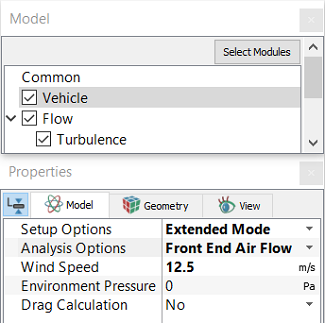
Vehicle module is used to set the operating conditions based on the analysis type:

  • Analysis Options: Select Front End Air Flow or Underhood Thermal from the drop-down list.
  • Wind Speed (normal inflow velocity at tunnel inlet).
  • Environment Pressure
  • Environment Temperature
  • Drag Calculation: Select Yes from the drop-down and set the following to calculate the drag on the vehicle
    • Frontal Area: Provide the frontal area of the vehicle
    • Drag Direction: Specify the flow direction
    • Drag Development Output: Select Yes from the drop-down list to write the drag development on the vehicle
 

Figure 7.33 - Vehicle module


For Simulation with Fan Plane

If the mesh is generated by selecting plane for fan, the DP vs Flow rate curve is used to model the fan.


For Simulation with Fan MRF

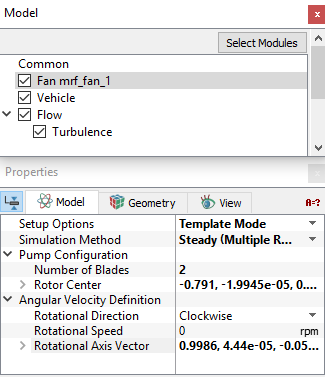
  • Fan modules are automatically added to the Model Panel as “Fan_mrf_fan_1 (fan# in built mesh)” if mesh is generated by selecting Blades as shown in Figure 7.34.
  • The fan center and axis are also set automatically. The Number of Blades are set to an arbitrary non-zero value.
  • Rotational Direction and Rotational Speed are user input.
  • If the mesh is generated by selecting Blades and Outer Surfaces for fan, the Center, Axis, Rotational Direction and Rotational Speed are user input.
 

Figure 7.34 - Simulation with fan mrf


Copyright © 2023 Simerics Inc.,