|
You are here: Automotive Templates and Tutorials > Vehicle Template > Vehicle FEAF Tutorial > Contours
|
Contours
The most common contours are velocity magnitude, total pressure coefficient and pressure contours across the domain. The steps to create contours are:
- Click Load Results in the Simulation Panel.
- Select the required result file in the ensuing Load Results dialog box, click Open.
Create a section
A section is created with the following steps.
- Click Create a Cross-Section
 icon in the Geometric Entities Panel. A new section Section 01 is created under Derived Surfaces.
 - Select the Section 01 under Derived Surfaces and specify the Type and Position as Plane Y and 0 m in the Geometry Tab of Properties Panel.
Velocity Magnitude
- Select Section 01 under Derived Variables in the Geometric Entities Panel.
-
Select Velocity Magnitude under Derived Variables list for the Variable drop-down list in the Results Panel.
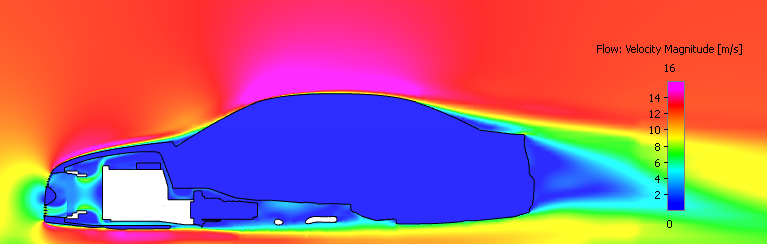
Figure 7.59 - Velocity magnitude at mid plane
Total pressure coefficient
- Select Section 01 under Derived Variables in the Geometric Entities Panel.
-
Select Total Pressure Coefficient under Derived Variables list for the Variable drop-down list in the Results Panel.
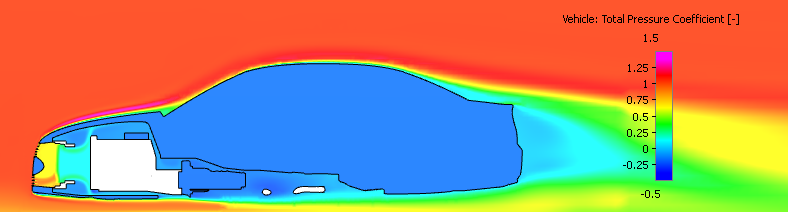
Figure 7.60 - Total pressure coefficient at mid plane
Pressure contours
- Select Boundaries listed in table Body_Rear_i1, Body_i2, Engine, Engine_1_i1, Exhaust, Grille, Mirror_Cover, Mirrors, Shroud, Underbody_1, Underbody_i2, Underhood_i2, WindShield_Guard_i1, front_intakes_1, front_intakes_i2, radiator_veh_dir3_max, radiator_veh_dir3_min, internal, lights_front_1, lights_front_i1, tyres_fr, tyres_rear, wheels_fr, wheels_rear, wheels_rear_1_i1, windows_1, windows_i1, windows_rear_i1 under vehicle in the Geometric Entities Panel.
- Select Pressure under Variables list for the Variable drop-down list in the Results Panel.
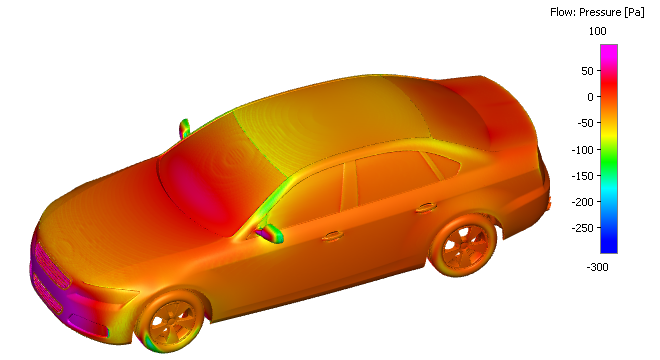
Figure 7.61 - Pressure contours
Iso surfaces contours for wake regions
- Click Create an Isosurface
 icon in the Geometric Entities Panel. An Isosurface 01 is created under Derived Surfaces.
 - Select Isosurface 01 under Derived Surfaces.
- Select Velocity X [Flow] from the Variables list in the Isosurface Variable drop-down list in the Geometry Tab of Properties Panel.
- Select Below Value from the Option drop-down list.
- Enter 0 m/s for Value.
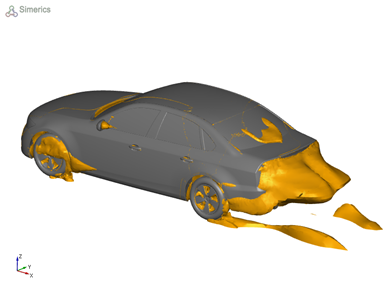
Figure 7.62 - Velocity X on isosurface contours (Top view) |
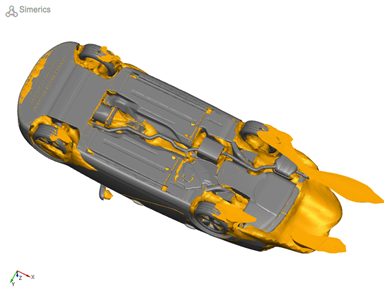
Figure 7.63 - Velocity X on isosurface contours (Bottom view) |